

The right Gmail shared inbox alternatives depend on how far you want to move from Gmail. Hiver keeps your team inside Gmail. Help Scout and Front replace it with a dedicated shared inbox. Freshdesk and Zendesk turn email into a full help desk. Sellio and Crisp put email and live chat in one inbox. For a five-person team, the plans below range from $20 to $325 a month, and the pricing model (per seat or per workspace) changes that number more than anything else.
This guide covers why Gmail-based setups stop working as a team grows, what to look for in a replacement, seven alternatives with honest trade-offs, and how to move your support address without losing a single email. Competitor prices come from each vendor's pricing page, checked on September 6, 2026.
Why Gmail-based shared inboxes break at around three people
Most teams start support in Gmail in one of three ways, and each one is reasonable at first:

- A shared login. Everyone signs in to support@ with the same password. It is simple and free, but you cannot see who sent what.
- Mail delegation. Teammates get access to the support mailbox from their own accounts. Google's delegation guide allows up to 10 delegates on a personal Gmail account and up to 1,000 on a Workspace account, with about 40 working in it at once under typical use.
- A Google Groups collaborative inbox. Mail to the group address lands in a shared list where members can assign conversations, mark them complete and filter for unresolved ones, at no cost beyond the Workspace accounts you already pay for.
With one or two people, any of these works. You talk across the desk, you know who is answering what, and the volume is low enough that nothing hides.
The trouble starts at about three people, or when someone works different hours. Two people open the same email and both reply, because nothing shows that a colleague is already typing. A customer gets a refund confirmation from one person and a request for their order number from another. Questions about a complicated case get forwarded to a colleague's personal inbox, and the context leaves the thread. Nobody can say how long customers wait for a reply, because Gmail and Google Groups do not measure it. And when someone leaves, a shared password has to be changed for everyone.
Gmail handles email itself perfectly well. It was designed for one person's mail, though, and a support queue needs a few things a personal inbox never had.
What to look for in a replacement
Before comparing tools, decide which of these you actually need. A team of three rarely needs all of them.
- Collision detection. A visible sign that a teammate is viewing or replying to a conversation. This alone fixes most double replies.
- Assignment and status. Every conversation has one owner and a clear state (open, waiting, closed), so nothing sits unowned.
- Internal notes and mentions. Ask a colleague a question inside the thread instead of forwarding the email.
- Your address stays the same. Customers keep writing to support@, and replies come from support@.
- Basic reporting. Response time, resolution time and volume, so you know when to hire.
- A pricing model that fits your growth. Per-seat pricing grows with every hire; per-workspace pricing does not.
- Other channels if you need them. If customers also reach you by live chat or messaging apps, one inbox for all of it saves a second tool.
Gmail shared inbox alternatives compared
| Tool | Type | Where your team works | Starting price | Pricing model |
|---|---|---|---|---|
| Hiver | Shared inbox inside Gmail | Gmail | Free; Growth $25/user/mo yearly | Per user |
| Help Scout | Dedicated shared inbox | Help Scout app | Free; Standard $25/user/mo | Per user |
| Front | Dedicated shared inbox | Front app | Starter $25/seat/mo | Per seat |
| Freshdesk | Full help desk | Freshdesk app | Growth $19/agent/mo | Per agent |
| Zendesk | Full help desk | Zendesk app | Support Team $19/agent/mo | Per agent |
| Sellio | Chat plus email inbox | Sellio web or Mac app | Free; Mini $20/mo for 5 seats | Per workspace |
| Crisp | Chat plus email inbox | Crisp app | Free; Mini $45/mo | Per workspace plus extra seats |
Hiver: best for teams that want to stay in Gmail
Hiver, Help Scout and Front are dedicated shared inbox tools. If email is your main channel and you mostly want Gmail's problems fixed, they are the smallest step: an email-like interface with collision detection, assignment, notes and reports added.
Hiver adds shared inbox features on top of Gmail, so your team keeps using the Gmail interface they know. Conversations get owners, statuses and internal notes without anyone opening a new app.
Pricing: Free at $0, Growth at $25 per user a month yearly ($35 monthly), Pro at $45 ($55 monthly) and Elite at $75 ($95 monthly). Five users on Growth come to $125 a month on a yearly plan.
- Pro: almost no change for the team, since it lives where they already work.
- Pro: a free plan to try it with real mail.
- Con: it only works with Gmail, so a later move away from Google means switching again.
- Con: per-user pricing, so every new hire adds to the bill.
Verdict: the gentlest upgrade from a collaborative inbox. Pick it if your team is attached to Gmail and email is nearly all your support. See how it compares in our Hiver alternative page.
Help Scout: best for email-first teams that want a simple tool
Help Scout is a shared inbox built for customer email, with a help center and live chat available on the same account. Customers see normal emails; your team sees a queue with owners, notes and saved replies.
Pricing: Free at $0, Standard at $25 per user a month, Plus at $45 and Pro at $75. Five users on Standard cost $125 a month. AI Answers, its chatbot, is billed at $0.75 per resolution.
- Pro: easy to learn for people coming straight from Gmail.
- Pro: help center included, which cuts repeat questions.
- Con: per-user pricing climbs as you grow.
- Con: AI answers cost extra per resolution.
Verdict: a strong default for a team that answers mostly email and values simplicity. For a closer look against a full help desk, read Freshdesk vs Help Scout for a 5-person team.
Front: best for teams that share email with other departments
Front turns team email into a shared workspace, and it is often used by operations and sales teams as well as support. It handles several shared addresses plus personal ones in one place.
Pricing: Starter at $25 per seat a month, Professional at $65 and Enterprise at $105. Five seats on Professional cost $325 a month. Its Autopilot AI agent starts at $0.05 per conversation, and Copilot is $20 per seat a month.
- Pro: good for teams where support, sales and operations all work out of email.
- Pro: strong rules and workflow options.
- Con: the most expensive per-seat option here at the Professional tier.
- Con: more setup than a small support team usually needs.
Verdict: worth it when email collaboration spans the whole company. For a support-only team of three to five, simpler tools cost less. Our Front alternative page has the full comparison.
Freshdesk: best for structured ticketing on a budget
Freshdesk and Zendesk are full help desks. They turn every email into a ticket with a status, priority and owner, then add SLAs, a knowledge base and detailed reporting, which suits teams with process requirements, several queues or high volume.
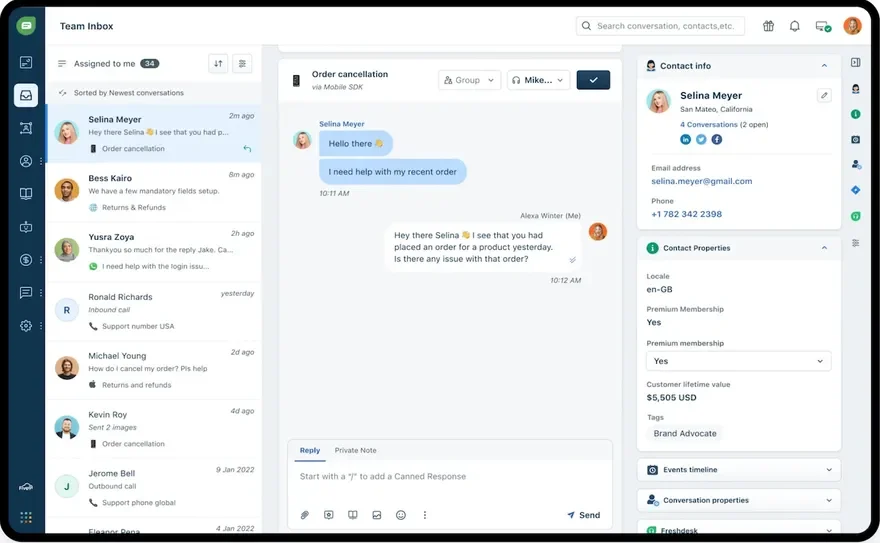
Freshdesk is a ticketing help desk with email, a knowledge base and automations. It is more process-heavy than a shared inbox, which some teams want and others find slow.
Pricing: Growth at $19 per agent a month, Pro at $55 and Enterprise at $89. Five agents on Pro cost $275 a month. Freddy AI Copilot is $29 per agent a month yearly, and AI agent sessions are $49 per 100 after a one-time trial of 500.
- Pro: low entry price on Growth.
- Pro: real ticketing, SLAs and reporting when you need them.
- Con: emails become tickets, which feels heavier than an inbox for small teams.
- Con: the useful features sit on the higher tiers, priced per agent.
Verdict: choose it if you want formal ticket workflows. Most teams leaving Gmail at three people do not need them yet.
Zendesk: best for teams that will grow into a large operation
Zendesk is the long-standing enterprise help desk, with email, chat, phone and a large app marketplace.
Pricing: Support Team at $19 per agent a month, Suite Team at $55, Suite Professional at $115 and Suite Enterprise on request. Five agents on Suite Team cost $275 a month. AI agents are billed per automated resolution on top of seats, and Copilot is a $50 per agent add-on.
- Pro: scales to very large teams and complex routing.
- Pro: phone support, which most tools here lack.
- Con: a lot of configuration for a small team.
- Con: costs stack up quickly with seats, add-ons and AI resolutions.
Verdict: right for teams planning on dozens of agents or phone support. Usually too much for a team just leaving Gmail.
Sellio: best for small teams that want email and chat at a flat price
Sellio and Crisp are chat plus email platforms. If customers also reach you by live chat on your website, or you plan to add chat, one inbox for both channels is simpler than an email tool plus a chat tool.
Sellio is a shared inbox and live chat platform for support teams of about two to twenty people. You forward your existing support address into it, so customers keep writing to support@ and get email replies, while your team works email, website chat, Telegram and other channels in one team inbox with assignment, notes, tickets and reports. WhatsApp and Instagram are coming soon.
Pricing is per workspace, never per seat. Free is $0 for 2 seats with website chat, Mini is $20 a month for 5 seats and 3 channels, Essentials is $95 a month for 10 seats and 5 channels, and Plus is $295 a month for 50 seats. AI use past the included credits costs extra. The pricing page has the full plan list.
- Pro: five seats for $20 a month, and hiring a fourth or fifth person does not change the bill.
- Pro: live chat with an AI agent for your website in the same tool, plus a native Mac app.
- Con: the AI agent works on website chat only, so every email is answered by a person.
- Con: no phone, SMS or Facebook Messenger channel.
Verdict: a good fit if you want to fix shared email and add live chat without paying per seat. If you need email to become formal tickets with SLAs from day one, a help desk fits better. See how email works in Sellio.
Crisp: best for a multichannel inbox with included AI credits
Crisp combines live chat, email and social channels in one shared inbox, priced per workspace with a seat allowance.
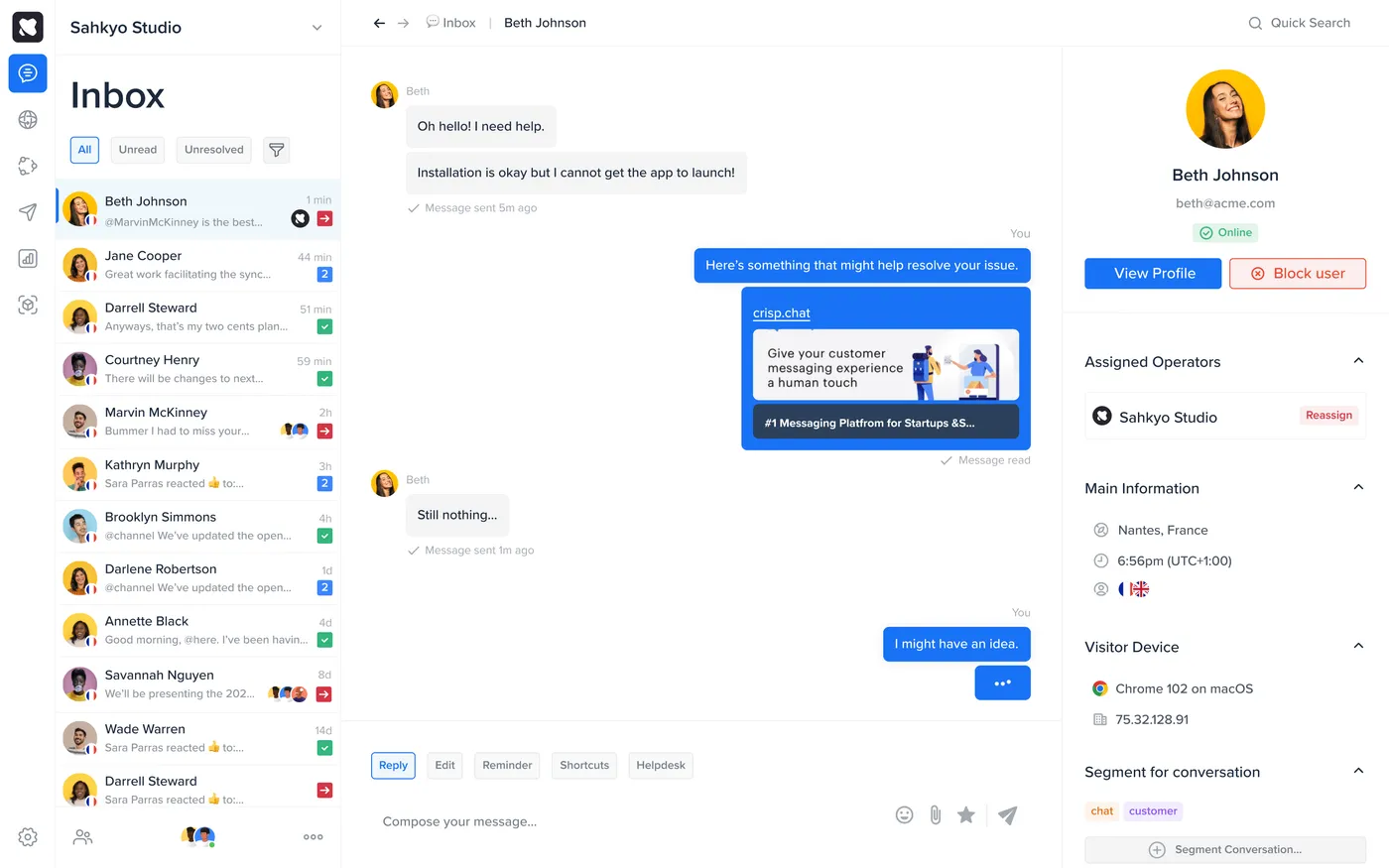
Pricing: Free at $0, Mini at $45 a month, Essentials at $95 and Plus at $295. Crisp's pricing page lists 4 seats on Mini and $10 a month for each extra seat, so five people on Mini cost $55. AI credits are included: $5 on Mini, $25 on Essentials and $75 on Plus.
- Pro: flat workspace pricing up to the seat allowance.
- Pro: many channels and a mature product.
- Con: extra seats are charged once you pass the allowance.
- Con: the AI credits on Mini are small.
Verdict: a solid choice for teams that want chat and email together. At five seats it costs more than Sellio's Mini; at ten seats both are $95.
Per-seat vs per-workspace cost at 5 and 10 people
When you leave Gmail, the pricing model matters as much as features, because a support team that grows from five to ten people doubles a per-seat bill. Here are the plans most small teams would actually pick:
| Tool and plan | 5 people | 10 people |
|---|---|---|
| Hiver Growth (yearly) | $125/mo | $250/mo |
| Help Scout Standard | $125/mo | $250/mo |
| Front Professional | $325/mo | $650/mo |
| Freshdesk Pro | $275/mo | $550/mo |
| Zendesk Suite Team | $275/mo | $550/mo |
| Sellio (Mini, then Essentials) | $20/mo | $95/mo |
| Crisp (Mini plus a seat, then Essentials) | $55/mo | $95/mo |
AI features are billed separately on most of these tools, per resolution, per conversation or per seat, so add your expected AI use before comparing. The seat vs workspace pricing calculator runs the comparison with your own team size.
Migration: moving your support address and history
The safest switch keeps your support address exactly as it is. Customers should never notice anything except faster, more consistent replies.
- Pick a quiet day and tell the team which day new mail stops being answered in Gmail.
- Connect the address in the new tool. Most tools give you a forwarding address; add it as a forward in Gmail, or as a member of the Google Group so new mail reaches both places during the switch.
- Set up sending as your domain. Follow the tool's instructions so replies come from support@ and pass your domain's email authentication, otherwise they may land in spam.
- Send test emails from a personal account and reply to them from the new tool. Check the reply's sender, threading and signature.
- Decide what to do with history. Some tools import past Gmail threads; otherwise keep the old mailbox or group readable for a few months so anyone can search it.
- Recreate your saved replies, labels and signatures in the new tool before the switch, not after.
- Remove teammates from the Google Group's email delivery once the new tool is live, or they will get a second copy of every email.
The free support tool migration checklist covers the same steps with room to note costs and owners.
What to do about customers who email you directly
A shared inbox only works if mail reaches it. In small companies, regular customers often email the person who helped them last, and that thread lives in one personal inbox where no one else can see it.
- Reply from the shared address. When a teammate answers from the new tool, the customer's next message goes to support@, and over a few weeks most customers follow.
- Forward and redirect. When a customer writes to someone personally, forward it to support@ and answer from there, copying the customer so the thread continues in the shared inbox.
- Point to support@ in personal signatures, for example "For order questions, write to support@yourstore.com so the whole team can help."
- Keep personal threads for real relationships, such as a wholesale buyer or a key account. Everything else belongs in the shared inbox.
Which option fits which team
- Two or three people, email only, happy in Gmail: stay on a collaborative inbox, or add Hiver when double replies start.
- Three to ten people, mostly email, want simplicity: Help Scout.
- Support, sales and operations all share email: Front.
- You need formal tickets, SLAs and many queues: Freshdesk, or Zendesk if you expect to grow large.
- Customers also use website chat, and you want the bill to stay flat as you hire: Sellio or Crisp.
Run a two-week trial with real customer email before you cancel anything in Google. Judge the trial on two things: whether double replies stopped, and whether you can now see how long customers wait.
FAQ
Does Gmail have a shared inbox?
Not as a dedicated feature. The closest options are mail delegation, where teammates access one mailbox from their own accounts, and a Google Groups collaborative inbox, which adds assignment and resolution status to a group address. Neither has collision detection or response time reporting.
Is a Google Groups collaborative inbox free?
Yes, it is included with Google Workspace, so there is no extra charge beyond your existing Workspace accounts. A group owner or manager has to turn on the collaborative inbox features and set who can assign and resolve conversations.
How many people can use a delegated Gmail account?
Google allows up to 10 delegates on a personal Gmail account and up to 1,000 on a Workspace account. Under typical use, about 40 delegates can work in the account at the same time.
Can I keep my support email address when I switch?
Yes. Nearly every shared inbox and help desk works by forwarding your existing address into the tool and sending replies as that address, so customers do not notice the change.
What is collision detection?
It shows when a teammate is viewing or replying to a conversation, so two people do not answer the same customer. It is the feature Gmail-based setups miss most once a team passes two or three people.
Can my team keep working inside Gmail?
Yes, with a Gmail add-on such as Hiver. The trade-off is that you stay tied to Google, and adding live chat or other channels usually means a second tool.