

Front vs Hiver comes down to one question: should your team keep working in Gmail, or move into a separate app? Hiver turns shared addresses like support@ into a managed queue inside Gmail, so nobody learns a new tool. Front is its own app that pulls email, chat, SMS and social messages into one place. For a five-person team at our 6 September 2026 price check, Hiver Growth costs $125 a month billed yearly, while Front costs $325 a month on Professional, the first plan that mixes channel types.
If your support is almost all email and everyone already lives in Google Workspace, Hiver is the cheaper and faster choice. If email is only half the story and you also answer SMS, social or chat in volume, Front gives you a single queue that Hiver does not fully match.
Side-by-side comparison
| Front | Hiver | |
|---|---|---|
| Where agents work | Front's own desktop and web app | Inside Gmail, through a Chrome extension |
| Entry paid plan | Starter, $25 per seat a month | Growth, $25 per user a month yearly ($35 monthly) |
| Five seats on the plan most small teams pick | $325 a month (Professional) | $125 a month (Growth, yearly) |
| Seat limits | Starter caps at 10 seats, Professional at 50 | No cap stated on the plans we checked |
| Channels | Email, chat, SMS, social; Starter allows one channel type only | Email, live chat and self-service on Growth; voice is an add-on |
| Automation | 10 rules on Starter, 20 on Professional, unlimited on Enterprise | Rule-based automations from Growth |
| AI | Autopilot (per conversation) and Copilot (per seat) are add-ons; Copilot is included on Enterprise | AI Agents, AI Copilot and AI Knowledge Builder listed on Growth |
| SLAs and CSAT | SLA and CSAT reporting in analytics | SLAs and CSAT surveys from Pro |
| Setup | New app, new habits; plan for a week or two of rule tuning | Install, connect shared addresses, start the same day |
Prices come from Front's pricing page and Hiver's pricing page, checked 6 September 2026. Both companies change plans often, so confirm before you buy.
Front: a standalone inbox for every channel
Front began as a shared inbox and has grown into a customer operations platform. You leave your email client and work in Front's own app, where email, chat, SMS and social messages share one queue with rules, workspaces and analytics around it. It fits a support team that also works threads with account managers, sales or operations.
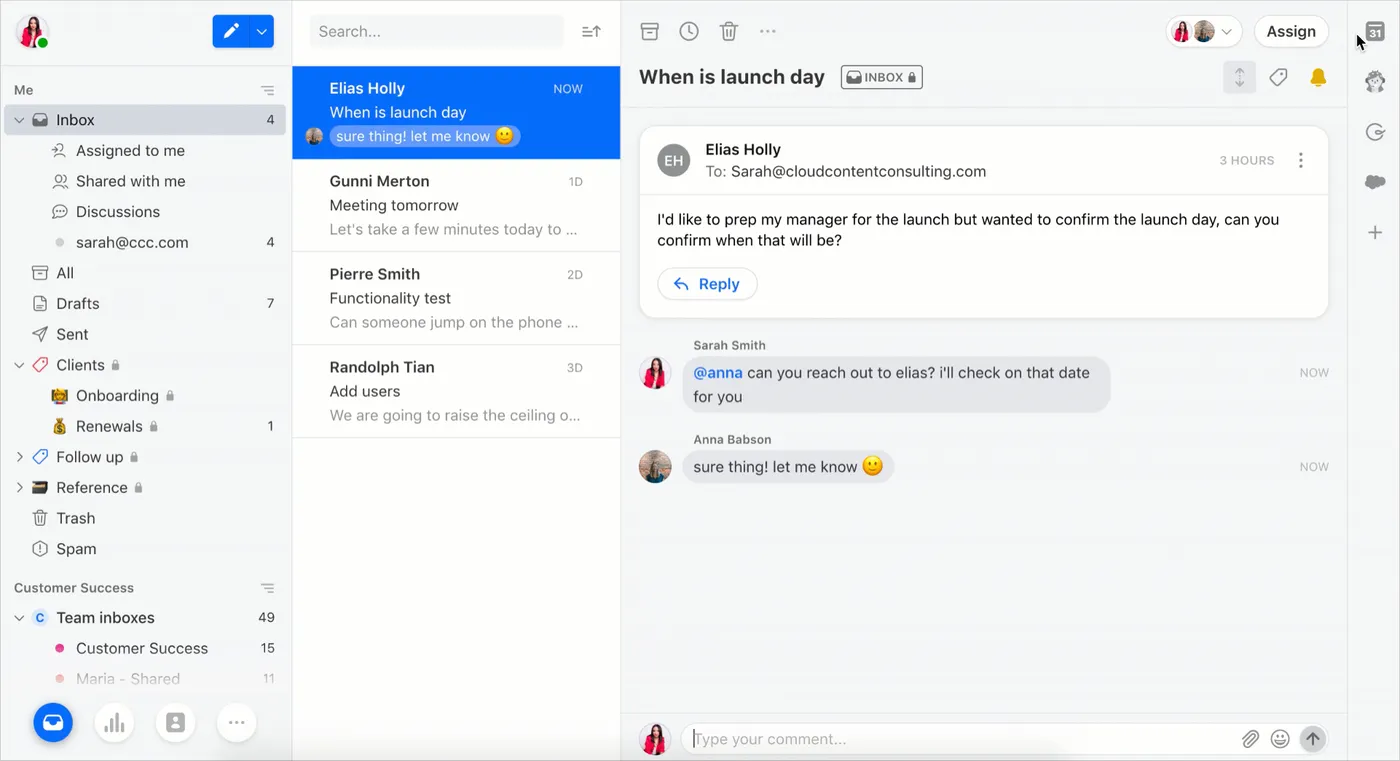
Agents can still connect a personal inbox, but the team queue lives in Front, with its own views, filters and keyboard shortcuts. The learning curve is real, and most teams need a week or two before the rules and views feel right. In return, the inbox does not care which channel a message came from.
Hiver: a help desk inside Gmail
Hiver began as a way to share Gmail labels and grew into a help desk that never asks agents to leave Gmail. A shared address like support@ shows up in the Gmail sidebar. An agent opens an email, assigns it, sets it to pending or closed, and leaves a note for a colleague without switching tabs. Training takes an afternoon because the email client stays the same.
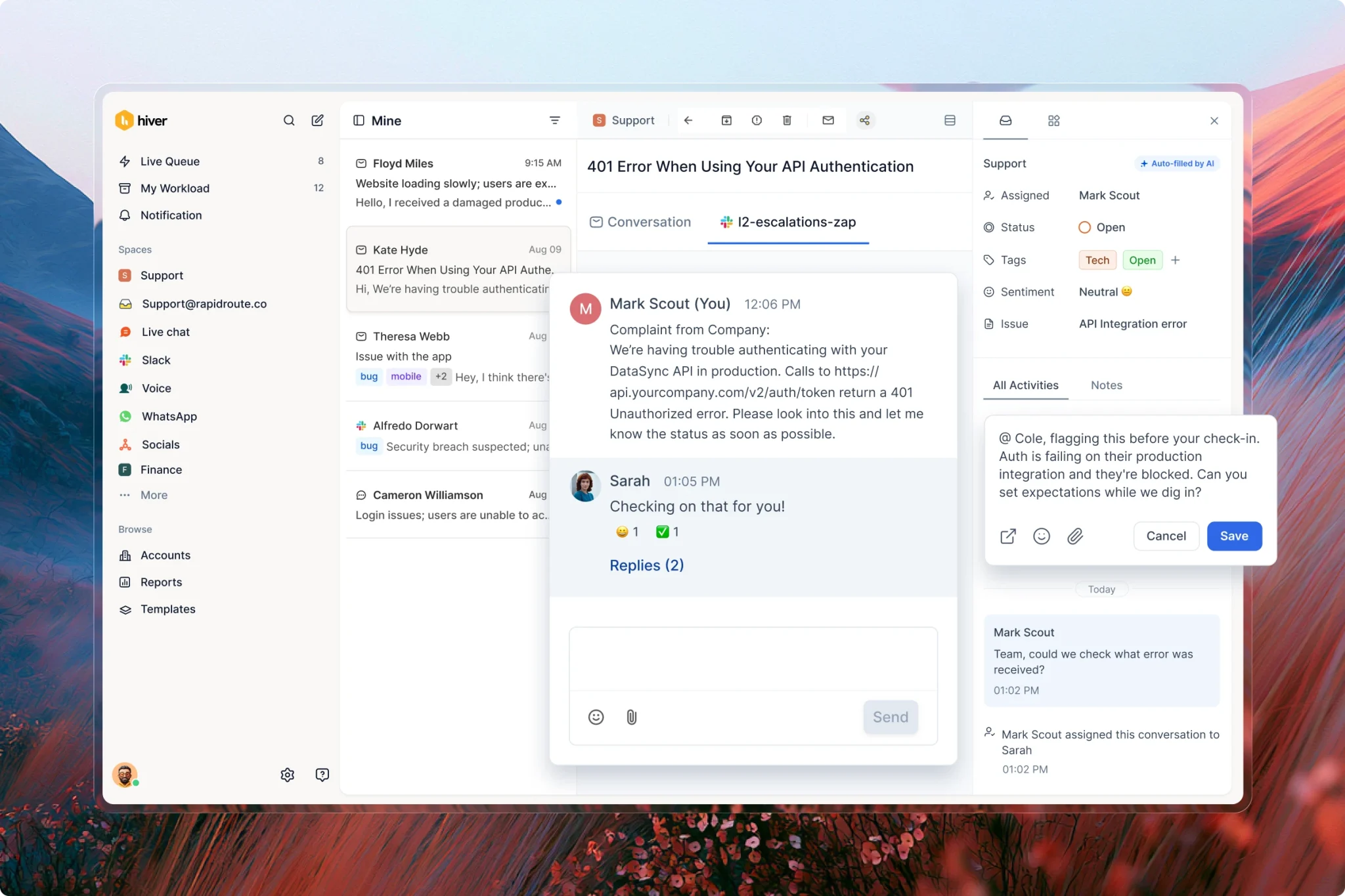
The catch is that your support desk now depends on how Gmail behaves, and agents see personal mail and the team queue in one window. Some people like that; others find it noisy. Teams on Outlook should test Hiver's current options in a trial before committing, because the product is designed around Gmail first.
Front vs Hiver pricing for five seats
Five seats is a common size for a support team that has just outgrown a shared Gmail password. Here is what each plan costs at that size, per month, from the vendors' published prices on 6 September 2026.
| Plan | Per seat | Five seats a month | What you give up |
|---|---|---|---|
| Hiver Growth | $25 yearly, $35 monthly | $125 yearly, $175 monthly | SLAs, CSAT surveys, customer portal |
| Hiver Pro | $45 yearly, $55 monthly | $225 yearly, $275 monthly | AI QA and AI Insights, which are Elite only |
| Hiver Elite | $75 yearly, $95 monthly | $375 yearly, $475 monthly | Little at this size |
| Front Starter | $25 | $125 | Only one channel type, 10 rules, no macros |
| Front Professional | $65 | $325 | AI is extra |
| Front Enterprise | $105 | $525 | Autopilot is still an add-on |
Both entry prices read $25, and many comparisons stop there, but the plans do different jobs. Front Starter is fine for a pure email team of up to 10 people, but the moment you want chat or SMS beside email you are on Professional at $65 a seat. Hiver Growth already lists live chat next to email.
Add AI and the gap widens. Front Copilot is $20 per seat a month on Starter and Professional. Five seats on Professional with Copilot comes to $425 a month before any Autopilot conversations, which start at $0.05 each. A ten-person team on Front Professional with Copilot pays $850 a month; the same team on Hiver Growth pays $250 a month billed yearly.
If you want to model your own headcount, our seat vs workspace pricing calculator shows how per-seat bills grow as you hire.
Assignment, collisions and internal notes
The core shared inbox jobs are close to even. Both tools let you:
- Assign a conversation to one person, so it has a clear owner
- Set a status (open, pending, closed) and snooze until a date
- Leave internal notes and @mention a teammate without the customer seeing it
- Warn you when a colleague is viewing or replying to the same email, so two people do not answer twice
- Share reply templates across the team
Front is stronger when a thread needs several people. Comments sit beside the email, you can draft a reply and ask a teammate to review it before it goes, and a conversation can be shared into another team's workspace. Hiver handles one owner per email well; reviewers on TrustRadius say it gets messier when the same email sits in several shared inboxes and different teams need to act on it at once.
Round-robin assignment exists on both, which matters once you have three or more agents and nobody wants to be the person who triages the queue every morning.
Automation and rules
Front meters rules by plan: 10 on Starter, 20 on Professional and unlimited on Enterprise, where "smart rules" can branch on conditions. Twenty rules sounds like plenty until you add one per product line, one per language and a few for VIP customers. Count the rules you run today before you pick a tier.
Hiver lists rule-based automations from Growth, covering the usual jobs: assign by sender or subject, tag by keyword, set a status, and escalate when something has waited too long. SLA policies, which alert you when a first reply or resolution is late, start on Pro.
Try this during either trial: write down your five most common email types (refund request, delivery question, invoice copy, bug report, sales lead) and build a rule for each. If you cannot finish in an afternoon, that tells you something about the next year.
AI features: Autopilot and Copilot vs Hiver's AI
Front sells AI in pieces. Copilot drafts replies and summarises threads for $20 per seat a month, and is included on Enterprise. Autopilot, the AI agent that answers customers on its own, is billed from $0.05 per conversation on every plan. Smart QA is another $20 per seat unless you are on Enterprise. Front also includes AI Topics on every plan, which sorts conversations by subject for reporting.
Hiver's first AI bot, Harvey, closed "thank you" replies so they did not reopen tickets. Its pricing page now lists AI Agents, AI Copilot and AI Knowledge Builder on the Growth plan, with AI QA and deeper insights on Elite. Hiver's pricing page lists no per-conversation AI fee, so the bill is easier to predict.
Two cautions apply to both. An AI agent is only as good as the help articles and past replies it reads, so budget time to write those first. And per-conversation pricing, like Front's Autopilot, rewards you for setting a monthly cap before launch; this overview of an AI agent with a spending cap and human handoff shows what to look for.
Channels beyond email
Front Professional handles email, live chat, SMS, social channels and more in one queue, with native WhatsApp as a paid add-on. Starter limits you to a single channel type, so a team that wants email and chat together needs Professional.
Hiver is email first. Growth adds live chat and a self-service help center, and voice is an add-on. Slack and social media channels are not part of Hiver's core plans, according to comparisons by competitors that have tracked both.
Ask where your messages come from today and where they will come from in a year:
- Over 80 percent email, and staying that way: Hiver covers you.
- Email plus a growing chat or SMS share: Front, or a lighter multi-channel tool.
- Instagram or WhatsApp in volume: test both tools on that channel during the trial, because add-on pricing and message fees change the math.
Reporting and SLAs
Both tools report on first response time, resolution time and volume by inbox or teammate. Front's analytics deepen on Professional and add custom reports on Enterprise. Hiver includes pre-built analytics from Growth and puts SLA tracking and CSAT surveys on Pro.
For a small team, the question is whether you will look at the reports weekly. If you will, Hiver Pro or Front Professional both give you enough. If you only need a monthly check, a simple scorecard is often all it takes; our free support KPI scorecard works with numbers from either tool.
Setup and migration
Hiver wins setup by a wide margin. You install it, connect support@ and billing@, invite the team, and the shared inbox exists the same day. Your email history is already in Gmail, so there is nothing to import.

Front setup takes longer because you are moving the team into a new tool:
- Connect each shared address and decide which teammates see which inbox.
- Rebuild your templates and tags in Front.
- Write the rules, then run them in parallel with the old process for a week.
- Train the team on views and keyboard shortcuts.
- Switch forwarding and retire the old shared login.
Leaving Hiver later is also easy because the email never left Gmail. Leaving Front means exporting conversations and rebuilding rules elsewhere, so give the trial a real workload before you commit.
Choose Front or Hiver
Choose Hiver if:
- Your team is on Google Workspace and support is mostly email
- You want the shared inbox running this week without retraining anyone
- You want AI on the entry plan without per-conversation fees
- You are cost sensitive and expect to add seats
Choose Front if:
- You handle email, SMS, chat and social in one queue
- Threads often need input from several teams before a reply goes out
- You need deeper rules, multiple workspaces or custom roles
- You are not tied to Gmail, or you would rather support lived outside it
Both bill per seat, so both bills rise every time you hire. If your support starts in email but your customers also reach you on website chat, Telegram or Slack, a workspace-priced shared inbox is the third option to look at. Sellio connects email alongside those channels, includes five seats on the $20 Mini plan and ten on the $95 Essentials plan, and its AI agent answers on website chat only, handing email to your team. Our Front alternative and Hiver alternative pages compare it line by line, and the shared inbox overview shows how email fits beside chat. For another per-seat comparison at the same team size, read Freshdesk vs Help Scout for a five-person team.
FAQ
Is Hiver cheaper than Front?
At five seats, yes, on the plans most teams need. Hiver Growth was $125 a month billed yearly on 6 September 2026, against $325 for Front Professional. Front Starter matches Hiver's $25 entry price but allows only one channel type.
Does Hiver work without Gmail?
Hiver is designed around Gmail and Google Workspace, and that is where it works best. If your team uses Outlook or another provider, check Hiver's current options in a trial before you plan around it.
Which has better AI, Front or Hiver?
Front's AI is more modular: Copilot per seat, Autopilot per conversation, QA per seat. Hiver lists its AI agents and copilot on the Growth plan. Hiver's bill is easier to predict; Front gives you more control over which AI you pay for.
Can Front or Hiver handle live chat and WhatsApp?
Front handles live chat on Professional and above, with native WhatsApp as a paid add-on. Hiver lists live chat on Growth. If WhatsApp is a large share of your volume, test it on both before you buy.
How long does it take to switch from a shared Gmail inbox?
To Hiver, usually a day, since nothing moves. To Front, plan for one to two weeks of setup and parallel running, mostly spent rebuilding rules and templates.