

If you are choosing between Freshdesk vs Help Scout for a five-person support team, you are really choosing between two opposing ideas of what customer support looks like. Freshdesk treats customer messages as service desk tickets that move through queues, priorities, and escalation tiers. Help Scout treats them as email threads between two people, stripping away visible ticket IDs and customer portals so the exchange feels like ordinary conversation.
That philosophical split changes everything about how your week runs. It determines whether your reps spend their mornings updating dropdown menus or answering people. It changes what your customers see when they open their inbox. It also sets your monthly software bill. For five agents, Freshdesk Pro runs $275 a month ($55 per agent per month). Help Scout Standard runs $125 a month ($25 per user per month). Once you turn on artificial intelligence features, that gap gets wider because the two vendors bill for automated help using completely different math.
Here is how to make the call without overthinking it:
- Pick Help Scout if your queue is mostly email, you want replies to look like plain human messages, and nobody on your team has time to manage complex routing rules, custom ticket statuses, or portal permissions. It gets out of the way fast.
- Pick Freshdesk if you run incoming phone calls, manage strict contractual response deadlines with financial penalties, or need multi-department escalation where tier-two engineers handle internal handoffs. It gives you deep command over traditional service desk machinery, though you will spend real time maintaining it.
- Look past both if your team works across website chat and modern messaging channels, or if you hate watching your software bill climb every time you bring on a part-time agent.
Head-to-head comparison for five agents
A team of five sits in an awkward middle ground. You have outgrown a shared Gmail address because people overwrite each other's drafts and lose track of who owns what. At the same time, you do not have an IT manager or a systems administrator whose only job is building automation workflows. The person configuring the tool is usually the person who has to answer sixty messages before lunch.
Here is how the two platforms stack up across the everyday areas that matter to a team this size:
| Operational area | Freshdesk (Pro tier) | Help Scout (Standard tier) |
|---|---|---|
| Five-seat monthly bill | $275 per month ($55 per agent) | $125 per month ($25 per user) |
| Primary inbox model | Ticket queues with IDs, priorities, categories, and explicit statuses | Shared inboxes formatted like personal email threads |
| Setup time to go live | Two to four days to configure groups, statuses, and routing logic | Under an hour to forward your address and invite coworkers |
| Live chat capability | Freshdesk Omni widget with scripted conversational flows | Beacon widget combining docs search and live messaging |
| Voice and phone calls | Native cloud phone system with call recording and routing | Requires an external phone integration like Aircall |
| AI agent billing | Billed per 24-hour session whether the issue is resolved or not | Billed strictly per resolution ($0.75 per confirmed answer) |
| Agent drafting tools | Freddy AI Copilot costs an additional $29 per agent per month | AI Inbox assistant included directly in the plan |
| SLA configuration | Multi-tier policies with business hours and automated escalation | Manual tagging and saved workflows; no native SLA countdown timers |
| Customer-facing portal | Authenticated portal where customers track ticket histories and community forums | Public documentation site only; no ticket tracking portal |
| G2 ease of use rating | 8.8 out of 10 | 9.2 out of 10 |
The numbers in that table tell part of the story, but the real friction shows up in how each system handles a busy Tuesday morning. Let us walk through the details that determine whether your team stays sane or gets bogged down in administrative maintenance.
Freshdesk vs Help Scout pricing: the real math for 5 seats
Base tier prices on software marketing pages rarely match what hits your credit card. Add-on fees, channel limits, and AI meters change the bottom line quickly. All competitor pricing cited below was checked on 2026-09-06 on the official vendor pricing pages at Freshdesk Pricing and Help Scout Pricing.
To understand what you will actually pay, you need to look at what is included in each plan tier and where the surprise charges hide.
Freshdesk plan structure and add-on costs
Freshdesk sells its main ticketing tool across three primary paid tiers:
- Growth: $19 per agent per month ($95 a month for five seats). This tier covers basic ticketing, rule-based automations, custom ticket fields, and a knowledge base. It leaves out round-robin agent assignment, custom roles, customer satisfaction surveys, and advanced reports.
- Pro: $55 per agent per month ($275 a month for five seats). This is the tier most growing teams land on because it includes round-robin ticket assignment, service level agreement management, multilingual knowledge bases, and customer satisfaction surveys.
- Enterprise: $89 per agent per month ($445 a month for five seats). This plan adds skill-based routing, audit logs, and sandbox testing spaces.
The base seat cost is only the starting point. Freshdesk separates its artificial intelligence tools into two paid categories. First is the Freddy AI agent, which handles automated customer conversations. Freshdesk gives you a one-time trial pool of 500 sessions per account. When those 500 sessions run out, you must buy session packs at $49 per 100 sessions.
Second is Freddy AI Copilot, which helps agents write faster by summarizing long customer threads, expanding rough bullet points into polite paragraphs, and tweaking tone. That Copilot costs an extra $29 per agent per month on an annual contract. If all five of your agents want those writing shortcuts, that adds $145 every month on top of your $275 base plan, bringing your monthly software bill to $420 before you have paid for a single extra AI session pack.
Help Scout plan structure and usage limits
Help Scout structures its pricing around mailbox counts and feature access rather than locking operational tools behind high tiers:
- Standard: $25 per user per month ($125 a month for five seats). This tier gives you two shared mailboxes, one documentation site, the Beacon live chat widget, custom properties, and automated workflows. If your five-person team needs more than two mailboxes (such as support@, sales@, and billing@), each additional mailbox costs $10 a month.
- Plus: $45 per user per month ($225 a month for five seats). This plan bumps your mailbox limit to five, adds integrations for tools like Jira and Salesforce, and unlocks advanced team permissions.
- Pro: $75 per user per month ($375 a month for five seats). Aimed at larger companies, this tier includes 25 shared mailboxes, onboarding services, and enterprise compliance audits.
Help Scout takes a far friendlier approach to agent-facing AI tools. Writing help, such as thread summaries and tone adjustment, is included on the Standard plan at no extra charge per seat. You do not pay an extra monthly copilot tax for your agents to use it.
For automated customer-facing answers, Help Scout uses its AI Answers add-on, billed at $0.75 per resolution. Crucially, Help Scout bills only when the AI successfully answers the customer's question and the customer confirms it, or leaves without asking for a human rep. If the bot fails and the customer asks for a person, you pay nothing.
A realistic annual cost comparison
Suppose your five-person team handles 1,500 customer conversations each month. Of those, an AI agent resolves 200 simple queries, while your five human agents handle the remaining 1,300 conversations using internal AI tools to draft and polish their replies.
On Freshdesk Pro:
- Base seats: $275 per month ($3,300 per year).
- Freddy Copilot for 5 agents: $145 per month ($1,740 per year).
- 200 AI sessions per month: Two 100-session packs cost $98 per month ($1,176 per year).
- Total annual Freshdesk cost: roughly $6,216.
On Help Scout Standard:
- Base seats: $125 per month ($1,500 per year).
- Internal AI writing assistance: $0 (included in the base seat price).
- 200 AI resolutions at $0.75 each: $150 per month ($1,800 per year).
- Total annual Help Scout cost: roughly $3,300.
That is an annual difference of $2,916 for the exact same five people handling the exact same message volume. Freshdesk costs nearly double because it charges for agent copilots per seat and bills AI conversations as sessions rather than successful answers.
If you find both per-seat models hard to swallow, you are not alone. A shared inbox like Sellio takes a different approach by billing per workspace instead of per seat. On Sellio, the Mini plan costs $20 a month for five seats, while the Essentials plan costs $95 a month for up to ten seats, keeping software expenses flat as your team grows.
The inbox experience: ticket queues vs email conversations
The most important difference you will feel every day is the interface your team stares at for eight hours. Support software shapes how reps feel about their work. It also shapes how customers perceive your company.
How Freshdesk organizes work
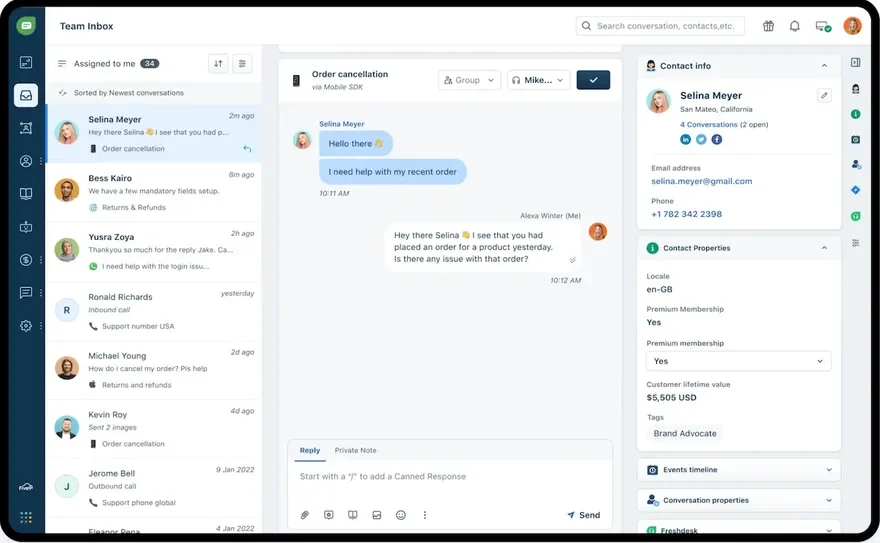
Freshdesk is built around a structured ticketing system. When an email arrives, it becomes a numbered item in a database, such as ticket #39104. The main view displays rows of tickets showing requester names, priority flags (Low, Medium, High, Urgent), current statuses (Open, Pending, Resolved, Closed), assigned agent groups, and countdown timers indicating SLA targets.
When an agent clicks into a ticket, the screen presents a comprehensive set of controls. Along the right sidebar are dropdown menus for ticket properties: Type, Source, Status, Priority, Group, and Agent. Reps can log time spent, add internal notes that appear on yellow backgrounds, or write a public response.
This layout gives support managers complete oversight. You can filter the queue by tickets that have sat in Pending status for more than 48 hours, or see every Urgent ticket assigned to the Tier 2 group. But for the agent handling fifty straightforward questions a day, clicking dropdown menus on every interaction creates friction. Every action requires making explicit decisions about metadata.
On the customer's end, Freshdesk's structure is visible. The email subject line includes an automated ticket tag like `[Ticket ID: #39104]`. If your configuration includes standard notification emails, the customer receives an automated confirmation the second their email arrives: "Thank you for contacting support. Your ticket has been received and is being reviewed by our team." Some customers appreciate the paper trail; many find it impersonal and bureaucratic.
How Help Scout organizes work
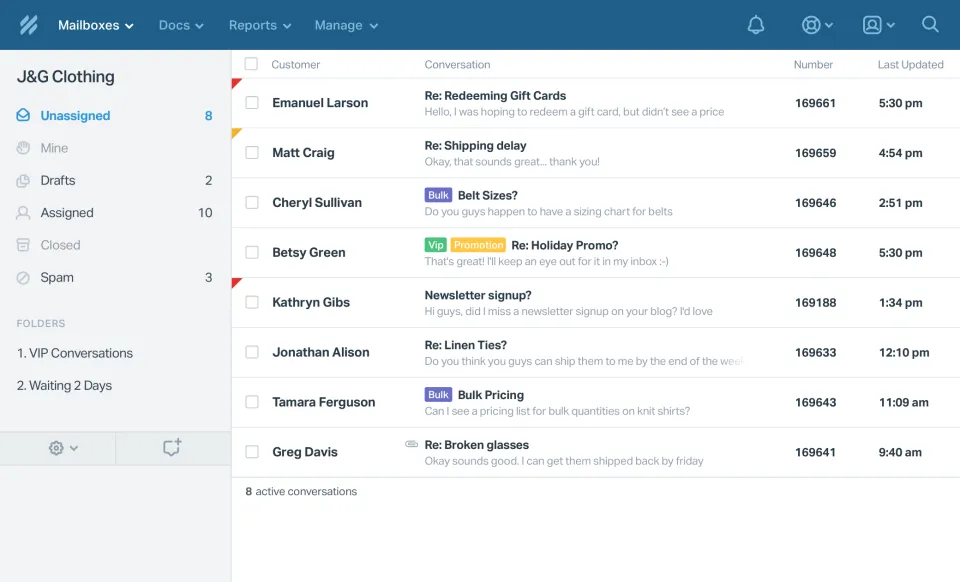
Help Scout strips away the ticketing apparatus. When a customer emails your support address, the conversation appears in a clean, email-style list. There are no ticket numbers, no priority badges, and no mandatory status dropdowns.
When an agent opens a conversation, the screen looks like a clean email client. The customer's message sits in the middle. On the right, a lightweight sidebar shows the customer's profile, past conversation history, and any custom fields your team has configured. To reply, the agent types into a compose box and hits send. The conversation moves from Unassigned to Mine, or closes automatically when the reply goes out.
Customers never see ticket tags in their subject line. The reply arrives in their personal inbox looking like it came from an individual using Apple Mail or Google Workspace. There is no automated autoresponder declaring that a ticket was created unless you build a workflow specifically to send one.
To keep teammates from stepping on each other, Help Scout relies on real-time collision detection. If two agents open the same conversation simultaneously, small profile icons appear at the top of the thread. If one agent starts typing a reply, the other sees a visible warning. Agents can mention colleagues in private internal notes using `@name` tags, making internal collaboration feel like a quiet conversation rather than a ticket reassignment.
For a five-person team where everyone handles general inquiries, Help Scout's setup eliminates unnecessary administrative tasks. Reps open messages, write helpful answers, and move to the next item without categorizing ticket states along the way.
Setup time and administrative overhead
Enterprise support tools assume you have weeks to plan an implementation. Small teams do not. If your setup takes three days of testing and configuration, that is three days where real customer questions go unanswered or pile up in an unmanaged inbox.
Third-party user reviews back this up. On G2's Freshdesk vs Help Scout comparison, Help Scout scores 9.2 out of 10 for ease of use, while Freshdesk sits at 8.8 out of 10. That gap comes down to how much configuration each tool demands before you can reply to your first customer.
Setting up Help Scout in sixty minutes
Getting a five-person team running on Help Scout is straightforward:
- Create an account and name your primary mailbox.
- Go into your domain registrar or Google Workspace admin console and set up standard email forwarding from support@yourcompany.com to your unique Help Scout mailbox address.
- Send email invites to your four teammates, who click a confirmation link, set passwords, and land directly in the shared inbox.
- Drop the Beacon JavaScript snippet into your website footer if you want live chat and docs search on your site.
Because there are few settings to adjust, onboarding a new team member takes five minutes. If someone knows how to use an email app, they know how to use Help Scout. You do not need to teach them how ticket lifecycles work, which categories are required, or how to clear SLA warnings.
Configuring Freshdesk Pro properly
Setting up Freshdesk Pro requires far more planning. You cannot simply turn on email forwarding and start typing without risking misrouted messages or broken automation loops. Before going live, you need to work through several setup menus:
- Ticket fields: Decide which fields are visible to customers and which are mandatory for agents before a ticket can be closed. If you require a Category field, your agents cannot close a conversation without picking an option.
- Groups and queues: Build routing buckets for your company (such as Support, Billing, Tier 2) and assign agents to each bucket with specific permissions.
- SLA policies: Define operating hours (for instance, Monday to Friday, 9 AM to 5 PM Eastern), set maximum initial response times (say, two hours for High priority, eight hours for Low), and establish resolution deadlines.
- Automation engines: Configure rules across three distinct triggers: Ticket Creation automations, Ticket Update automations, and Time Triggers that run hourly in the background.
- Notification templates: Customize the system emails sent to customers, agents, and administrators so they do not sound overly corporate.
If you fail to configure these rules correctly, tickets can fall into unassigned queues or trigger duplicate email notifications to customers. If you need tight operational controls, Freshdesk's flexibility is valuable. If you just want five people to answer customer emails collaboratively, it feels like heavy administrative overhead.
Channels: email, live chat, phone, and messaging
How your customers contact you should dictate your software choice. If you pick a tool that treats your primary communication channel as an afterthought, your team will fight the interface every day.
Voice support and call handling
This is where Freshdesk holds a clear, indisputable advantage. Through Freshdesk Omni, Freshworks provides an integrated cloud phone system. You can purchase local or toll-free numbers across dozens of countries, build interactive voice response (IVR) phone menus, set up call forwarding to mobile devices, record calls for quality assurance, and have voicemails automatically transcribed into tickets.
Help Scout does not have a native phone system. If your team takes incoming phone calls, you must buy a subscription to a third-party telephony app like Aircall, Talkdesk, or Dialpad, then connect it to Help Scout using an integration. The integration logs call summaries and voicemails inside customer threads, but you are still paying for two separate software platforms and managing two separate user directories. If inbound phone calls represent twenty percent or more of your daily support volume, Freshdesk is the much cleaner choice.
Website live chat widgets
Both platforms offer web widgets, but they approach website visitors with different goals.
Help Scout provides Beacon. Beacon is a clean widget that combines three functions: instant documentation search, email contact forms, and real-time live chat. When an agent toggles their status to available, Beacon offers live chat to visitors. When your team logs off, Beacon smoothly switches to an email contact form without showing an empty chat box. The interface is clean, fast, and matches modern consumer site design.
Freshdesk provides chat through Freshdesk Omni. Its chat widget focuses on structured bot flows and automated lead capture. You can design branching decision trees that ask visitors questions, collect email addresses, qualify leads, and route the conversation to specific agent groups before an agent ever touches the keyboard. If your primary goal for website chat is automated triage and routing, Freshdesk offers deeper native capabilities.
Modern messaging channels
Neither platform handles modern messaging apps particularly well for small teams. Freshdesk allows you to connect Facebook pages and WhatsApp numbers, but doing so requires navigating the complex Freshdesk Omni licensing tiers and marketplace add-ons. It is engineered for larger contact centers rather than small teams wanting quick setups.
Help Scout connects to Facebook and external messaging apps strictly through third-party integrations and webhooks. It treats modern messaging as an exception rather than a core communication channel.
If your customers contact you through apps like WhatsApp, Instagram DMs, or Telegram, you will quickly run into limitations with both tools. That is why newer support tools focus on unified channels from day one. On Sellio, for instance, a team connects website chat, email, Telegram, Slack, and Discord directly, with WhatsApp and Instagram integrations currently built and coming soon. Keeping those channels in one place prevents agents from juggling multiple browser tabs.
AI agents and copilots: sessions vs resolutions
Support software vendors talk constantly about artificial intelligence, but their pricing models vary wildly. The difference between paying for an AI session versus paying for an AI resolution will dramatically affect your monthly credit card charges.
As covered in Help Scout's analysis of Freshdesk, Help Scout limits its customer-facing AI agent to its Beacon chat widget, whereas Freshdesk allows its Freddy AI agent to respond across email, chat, and social channels. The true difference lies in how each platform defines a billable event.
Freshdesk AI billing: pay per session
Freshdesk charges for Freddy AI agents based on sessions. A session is defined as any customer interaction with the AI within a 24-hour window. It does not matter whether the AI solves the issue, misunderstands the prompt, or frustrates the customer so much that they demand a human representative.
Consider a customer who visits your site, triggers the Freddy AI bot, asks two questions, gets irrelevant answers, and finally types "talk to a person." Freshdesk counts that interaction as a paid session. After your initial one-time bucket of 500 trial sessions is exhausted, you must purchase session packs at $49 for every 100 sessions. If your website gets high traffic from visitors asking ambiguous questions, your monthly bill can climb quickly without any guarantee that issues were resolved.
Help Scout AI billing: pay per resolution
Help Scout prices its AI Answers feature strictly on confirmed resolutions. A resolution occurs when the AI answers the customer's question using content from your documentation, and the customer either explicitly clicks a button confirming the answer helped or closes the widget without asking for human assistance.
Help Scout charges $0.75 per resolution. If the AI attempts an answer, fails to help, and passes the user to an agent, you pay nothing. This alignment protects your budget: you only pay software fees when the bot saves your human team actual work.
Internal agent copilots compared
Beyond automated customer bots, both platforms offer tools to help human reps write faster.
Help Scout includes its AI drafting assistant on its Standard plan at no extra charge. Reps can summarize long email chains, expand brief notes into complete replies, and refine tone with one click. It is built directly into the reply box.
Freshdesk places equivalent writing tools inside its Freddy AI Copilot add-on, which costs an extra $29 per agent per month on a yearly agreement. For a five-person team, paying $145 a month ($1,740 a year) just to give five reps text summarization and tone adjustments is an expensive luxury that smaller companies often have to decline.
Automations, service level agreements, and routing
Automation is where Freshdesk shows its technical depth and Help Scout shows its focus on simplicity. Which one you need depends on whether your support team operates like a structured IT department or a nimble customer service group.

Freshdesk SLA management and rule depth
As highlighted on the Freshworks comparison page, Freshdesk is built for companies that need strict SLA enforcement. If your business signs enterprise contracts with guaranteed response times, Freshdesk gives you the tools to monitor and hit those commitments:
- Multi-tier SLA rules: You can build distinct SLA schedules based on client tiers (such as Enterprise vs Free), specific product lines, or ticket categories. You can define targets for first response time, every subsequent reply, and final resolution.
- Escalation trees: If a High priority ticket sits unassigned for ninety minutes, Freshdesk can automatically send an alert to a supervisor, raise the priority to Urgent, and reassign the ticket to an on-duty team lead.
- Time triggers: Freshdesk runs an hourly background engine that scans your entire ticket database. It can find tickets that have been in Pending status for three days, send a gentle reminder email to the customer, and close the ticket automatically if no response arrives after seven days.
- Round-robin assignment: Incoming tickets can be automatically distributed in a circle among active agents, balancing workloads across the team without manual triage.
These capabilities protect large support operations from dropping tickets. However, for a team of five, maintaining complex rule trees requires constant attention. It is easy to accidentally configure overlapping automation rules that conflict with each other, causing tickets to bounce between statuses or fire redundant notifications to customers.
Help Scout workflows and operational simplicity
Help Scout handles routing through straightforward logic statements called Workflows. A workflow consists of basic condition and action blocks:
- If the email subject contains "invoice" or "payment", assign the conversation to Sarah and apply the tag "Billing".
- If a conversation has been inactive for four days, close it and add the tag "Auto-Closed".
- If the sender's email domain matches a key partner account, apply a custom VIP tag and send an internal notification to the account manager.
Help Scout does not offer visual SLA countdown timers or complex escalation chains on its Standard plan. It relies on the assumption that five agents looking at a clean shared inbox can see unassigned conversations and pick them up collaboratively. If your contracts contain strict SLA clauses with financial penalties for late replies, Help Scout will feel too informal. If your team simply wants to answer messages quickly without managing routing logic, Help Scout's workflows are refreshingly simple to build and maintain.
Knowledge bases and customer portals
Giving customers accurate documentation cuts down the number of routine questions landing in your team's inbox. Both platforms offer documentation tools, but they structure the customer experience differently.
Help Scout Docs
Help Scout includes a standalone knowledge base tool called Docs. Setting up a Docs site takes very little effort. You write articles, organize them into categories, add screenshots, and publish them to a clean public site hosted on your own custom subdomain.
Docs links directly into Help Scout's Beacon widget. When a customer opens Beacon on your website, it reads the current page URL and automatically suggests relevant documentation articles. A customer viewing your billing settings page will automatically see articles about invoicing, updating credit cards, and receipts before they ever reach for a contact form. This contextual deflection stops routine questions from reaching your five agents.
Freshdesk knowledge bases and community portals
Freshdesk offers a full customer portal rather than just a simple documentation site. Through this portal, customers can browse your knowledge base, participate in public community discussion forums, and log into an account to see real-time updates on every ticket they have ever opened with your team.
Freshdesk Pro also includes multilingual knowledge base management. You can maintain help documentation translated into dozens of languages under a single domain, with language-switching menus built into the interface. If you support a global customer base across multiple languages, Freshdesk's internationalization features are far more capable than Help Scout's.
However, customer portals introduce a subtle barrier for smaller companies. When a customer has to register an account and remember a password just to check the status of a simple question, they often find the process frustrating. Most people prefer receiving a direct email reply in their existing inbox rather than logging into another vendor portal.
Reporting and support analytics
Managing a five-person team requires knowing whether you are keeping up with inbound volume, which problems take the longest to fix, and how customers evaluate their interactions with your reps.
Freshdesk analytics
Freshdesk Pro includes a reporting system called Freshdesk Analytics. It provides detailed dashboards with extensive data filtering:
- First contact resolution (FCR) rates broken down by agent group and ticket source.
- Average resolution times filtered by category, tag, and priority level.
- SLA compliance percentages showing exactly where response targets were met or breached.
- Agent performance tables comparing ticket volume, response velocity, and customer satisfaction ratings.
- Custom reporting builders that let you drag and drop dimensions, metrics, and chart formats into scheduled exports.
Freshdesk includes built-in Customer Satisfaction (CSAT) surveys. When an agent resolves a ticket, the platform sends an automated email asking the customer to rate their experience. You can track individual agent satisfaction scores, filter for negative responses, and set up automations to alert a manager whenever a customer leaves a poor rating.
Help Scout reporting
Help Scout focuses on operational clarity rather than deep data slicing. Its reports are divided into four pre-built views: Conversations, Email, Chat, and Team.
These dashboards tell you what you need to know quickly. You can see message volume broken down by day and hour, identify your busiest times of the week, track tag frequencies to identify software bugs, and review individual agent volume and response times. Customer satisfaction is measured through a simple rating prompt (Great, Okay, Not Good) embedded in agent email signatures.
For a five-person team, Help Scout's reporting provides clear answers in seconds. You do not need to build custom database queries or configure filters just to see if your team is falling behind on incoming messages. You open the dashboard, see the volume trends, and adjust schedules accordingly.
Migration realities: switching between platforms
Switching support platforms is tedious work. If you choose one platform and decide to move to the other six months later, you will face distinct operational hurdles.
Migrating from Freshdesk to Help Scout
Moving from Freshdesk to Help Scout is generally smooth. Help Scout provides automated migration tools that can import your historical Freshdesk tickets, customer profiles, and knowledge base articles directly into Help Scout mailboxes.
The biggest hurdle in this direction is cultural. Your agents have to adjust to working without ticket IDs, priority tags, and strict status menus. Old tickets appear as closed email conversations. Any complex multi-step automations you had in Freshdesk will need to be simplified into basic Help Scout workflows.
Migrating from Help Scout to Freshdesk
Moving from Help Scout to Freshdesk requires significantly more preparation. You are moving from an informal shared inbox into a structured ticketing database, which means you have to build operational infrastructure from scratch:
- Map your existing Help Scout tags to Freshdesk custom ticket fields, groups, and categories.
- Draft and configure your business hours schedules, holidays, and SLA target policies.
- Import your saved replies into Freshdesk's canned responses folder structure.
- Design and test your customer-facing email notification templates so your users understand their new ticket IDs and portal links.
If your team outgrows Help Scout and requires Freshdesk's structured controls, plan for at least two weeks of testing and configuration before cutting over your email addresses.
How to decide: Freshdesk vs Help Scout
To pick the right tool for your five-person team, look at your primary support workflow and evaluate which tradeoffs you are willing to accept.
Choose Help Scout if:
- You want simple, human communication where customers never see ticket numbers or portal logins.
- You want predictable monthly billing at $125 a month for five seats without expensive agent copilot add-ons.
- You want a system that can be fully set up and configured in under an hour without specialized IT assistance.
- You only need AI assistance inside your live chat widget, and you prefer paying strictly for successful answers ($0.75 per resolution).
- Your support volume is primarily handled through email, without requirements for inbound phone queues.
Choose Freshdesk if:
- You need an integrated phone system with call routing, IVR menus, and voicemail transcription built into the tool.
- You have contractual SLA response requirements that demand automated escalation paths and compliance reporting.
- You need a multilingual knowledge base to serve customers in multiple languages under a single domain.
- You want an AI bot that attempts to answer customer questions directly inside email threads, not just in a website chat widget.
- Your customers expect to log into a dedicated portal to view historical ticket statuses and participate in community forums.
When per-seat pricing gets in the way
Weighing Freshdesk vs Help Scout often highlights an irritating industry convention: both platforms force small companies onto per-seat subscription models. On Freshdesk Pro, five seats cost $275 each month. On Help Scout Standard, five seats cost $125 each month.
The trouble with per-seat pricing is that it penalizes your business as soon as your workflow changes. If you want to invite a freelance contractor for weekend coverage, give a product engineer access to debug customer bugs, or bring on a part-time billing specialist, your software bill climbs immediately. Many small companies end up sharing logins or copying text into internal chat tools just to avoid paying an extra monthly seat fee.
If you want a modern shared inbox without per-seat penalties, consider Sellio. Sellio is a shared inbox and live chat platform built specifically for support teams of two to twenty people.
Sellio prices by workspace, never per seat:
- Free: $0 per month, includes 2 seats and website chat.
- Mini: $20 per month per workspace, includes 5 seats and 3 channels.
- Essentials: $95 per month per workspace, includes 10 seats and 5 channels.
- Plus: $295 per month per workspace, includes 50 seats and 25 channels.
For a five-person team, Sellio's Mini plan costs $20 a month for the entire team, compared to $125 on Help Scout or $275 on Freshdesk Pro. If you expand to ten people, the Essentials plan costs $95 a month for the whole workspace. AI usage past the included credits costs extra, which keeps usage capped and predictable.
Live today, Sellio connects website chat, email, Telegram, Slack, Discord, and Notion, along with direct website integrations for WordPress, Shopify, Wix, Squarespace, Webflow, and custom frontends like React, Next.js, and Astro. Integrations for WhatsApp, Instagram, Facebook Messenger, Twilio SMS, Microsoft Teams, and Google Drive are built and coming soon.
Sellio also includes an AI agent that answers customer questions on your website using your own documentation. The AI hands off conversations to a human teammate whenever it is unsure, and you can set hard budget caps so costs never get out of hand. Sellio also provides a native Mac desktop app (with Windows coming soon), so your support team can work without keeping an extra browser tab open all day.
Sellio is not built for call centers that need phone PBX routing, nor does it cater to enterprise setups requiring HIPAA compliance. But for SaaS, e-commerce, and service companies with two to twenty support reps who want a collaborative, multi-channel inbox without per-seat overhead, it is a practical alternative. You can see how other platforms compare on our tool comparison page or review our tiers on the pricing page.
FAQ
Is Help Scout or Freshdesk easier for a small team to set up without IT help?
Help Scout is substantially easier to set up. Most teams set up email forwarding, invite their colleagues, and start answering real customer questions within an hour. Freshdesk requires configuring ticket categories, agent groups, SLA policies, and background automation rules before it is ready for customer use.
Does Freshdesk have a free plan that works for a five-person team?
No. Freshdesk offers a free tier, but it is capped at two agents. A five-person team must upgrade to a paid tier like Growth ($19 per agent per month) or Pro ($55 per agent per month) to support five active seats.
Can the AI agent answer customer questions on email, or only in live chat?
On Freshdesk, the Freddy AI agent can respond automatically across email, chat, and social channels. On Help Scout, the AI Answers bot is currently limited to the Beacon website chat widget, although Help Scout includes internal AI writing and summarizing assistance on email threads on all plans.
Do I need phone support, and does Help Scout offer it?
Help Scout does not have a native phone system. If your team answers incoming phone calls, you must connect a third-party telephony provider like Aircall. Freshdesk includes a native cloud PBX inside Freshdesk Omni, letting you buy phone numbers, answer calls, and log voicemails directly within the interface.
Which tool costs less once AI features are included?
Help Scout costs significantly less for small teams using AI. Help Scout charges $0.75 per successful resolution and includes internal AI drafting assistance in its base seat price. Freshdesk charges $49 per 100 sessions (which bill every 24-hour interaction regardless of whether the question was answered) and requires an extra $29 per agent per month for its Freddy Copilot drafting tool.
Which platform will my team outgrow first as we expand?
You are more likely to outgrow Help Scout if your support operations become heavily bureaucratic. If you eventually require strict ITIL service desks, complex departmental escalations, multi-brand customer portals, and call center routing, Freshdesk accommodates those enterprise workflows. Many growing companies stay on Help Scout for years precisely to keep their customer interactions human and fast.
Can I prevent two agents from answering the same message at the same time?
Both tools prevent duplicate replies. Help Scout uses real-time collision detection that shows an avatar when another agent opens a conversation and displays an active typing indicator when they start writing. Freshdesk includes agent collision alerts that warn you if someone else is viewing or editing a ticket.
How do custom fields compare between Freshdesk and Help Scout?
Freshdesk offers deep, hierarchical custom ticket fields. You can create dropdown menus that depend on prior selections (for example, selecting "Hardware" opens a secondary menu with specific device models). Help Scout provides custom fields in the conversation sidebar on its paid plans, but keeps them flat and simple, such as text inputs, numbers, dates, and basic dropdown lists.
What happens to our email formatting and signatures?
Help Scout preserves your email formatting so outgoing messages look like personal correspondence from Google Workspace or Apple Mail. Agents can set personal signatures or use a shared team signature. Freshdesk wraps outgoing emails in system notification templates that often include ticket numbers, reference lines, and portal links in the header and footer unless you spend time customizing the underlying HTML templates.
Final verdict
When you evaluate Freshdesk vs Help Scout for a five-person team, the decision comes down to whether you want structured ticket control or clean email collaboration.
If your team requires contractual SLA compliance, structured multi-tier escalations, multilingual portals, and built-in phone routing, Freshdesk Pro ($275 a month for five seats) delivers the control you need. You will just need to dedicate time to configuring its settings and managing its queues.
If your team values simple email workflows, personal customer relationships, fast onboarding, and transparent pricing ($125 a month for five seats), Help Scout Standard is the better fit. It keeps your team focused on helping customers rather than administrating software.
If neither tool fits your budget or channel requirements, look into workspace-based shared inboxes like Sellio, where your support costs stay fixed regardless of how many seats your team needs.






