

The best live chat software for small business depends mostly on two numbers: how many people will answer chats, and whether you need an AI bot on day one. If the budget is zero, start with tawk.to. If you want a bot on a small budget, look at Tidio or Crisp. If chat is a sales channel, LiveChat is built for it. Email-first teams fit Help Scout, Shopify stores fit Gorgias, and teams that need a full help desk end up on Intercom or Zendesk. If you want one flat price for a team working chat, email and Telegram together, Sellio is the option we build.
Every price below is the vendor's own list price, checked on 6 September 2026, and we worked out what each tool costs for a team of three and a team of five, because that is where small-business bills start to split.
Quick comparison: 9 live chat tools at 3 and 5 agents
| Tool | Best for | Free plan | 3 agents, per month | 5 agents, per month | How AI is billed |
|---|---|---|---|---|---|
| Sellio | Small teams on several channels | Yes, 2 seats, website chat | $20 (Mini) | $20 (Mini) | Included credits, then usage |
| Crisp | Chat plus email on a flat plan | Yes, 2 seats | $45 (Mini) | $55 (Mini plus a seat) | Credits included per plan |
| Tidio | Low-volume stores that want a bot | Yes, 50 conversations a month | $24.17 (Starter) | From $49.17 (Growth) | Lyro from $32.50 a month |
| tawk.to | Zero budget, any team size | Yes, no seat limit | $0, or $29 without branding | $0 to $58 with add-ons | AI Assist from $29 a month |
| LiveChat | Chat as a sales channel | No | $147 (Team, yearly) | $245 (Team, yearly) | Copilot included, ChatBot extra |
| Help Scout | Email-first teams adding chat | Yes | $75 (Standard) | $125 (Standard) | $0.75 per AI resolution |
| Gorgias | Shopify stores | No | $10 to $60, by ticket volume | $60 (Basic) | About $0.90 to $1.00 per resolution |
| Intercom | SaaS teams that want Fin | No | $87 (Essential) | $145 (Essential) | Fin from $0.99 per outcome |
| Zendesk | Teams that need a full help desk | No | $165 (Suite Team) | $275 (Suite Team) | Per automated resolution, Copilot $50 per agent |
Two things the table hides. Per-agent tools (LiveChat, Help Scout, Intercom, Zendesk) grow with every hire, while Crisp, Tidio, Gorgias and Sellio price by plan, so a sixth teammate may cost nothing. And AI is almost never in the headline price: it is a separate meter on most of these tools.
How we evaluated live chat tools
We looked at each tool the way a team of two to ten would on a Monday afternoon, with a credit card and an hour to spare. For the best live chat software for small business, four questions decided the order:

- Install: can a non-developer paste one snippet into WordPress, Shopify, Wix or a custom site and have chat working the same day? All nine can. The difference shows up afterwards, in how much routing and inbox setup you need before the chat is useful.
- Price at 3 and 5 agents. Starting prices are marketing. We multiplied out the plan a real team of three and of five would need, using only published list prices.
- AI options: is there an AI agent, what does it answer from, and is it billed per seat, per conversation or per resolution? A per-resolution bot is cheap in a quiet month and expensive in a busy one.
- Branding and channels: can you make the widget look like your site, and can the same inbox take email and messaging apps when you need them?
We did not score "number of integrations" or feature counts. A team of three uses a small part of what any of these tools can do, so we weighed the parts you will touch every day.
1. Sellio: flat workspace pricing and one-script install
We make Sellio, so read this entry knowing that. It is a shared inbox with live chat for support teams of about 2 to 20 people, priced per workspace instead of per seat.
Best for: small SaaS, e-commerce and service businesses whose customers write in on more than one channel, and who do not want the bill to grow with each hire.
What stands out
- The chat widget installs with one script tag on any site, and you theme it to your brand.
- Website chat, email, Telegram, Slack and Discord land in one shared inbox. WhatsApp, Instagram and Facebook Messenger are coming soon.
- An AI agent answers visitors from your own website and documents, hands off to a person when it is unsure, and can be capped so spend cannot run away. It answers on website chat only; messages from other channels go to a person.
- Tickets, automations and support analytics run over the same conversations, and there is a native Mac app (Windows is coming soon).
Pricing: Free is $0 for 2 seats and website chat. Mini is $20 a month for the workspace with 5 seats and 3 channels. Essentials is $95 a month for 10 seats and 5 channels, and Plus is $295 a month for 50 seats and 25 channels. AI use past the included credits costs extra. Full details are on the pricing page.
Pros
- Five people cost the same $20 as three.
- One inbox for chat, email and Telegram from the start.
- AI spend has a hard cap.
Cons
- No phone channel; SMS and Messenger are still coming soon.
- The AI agent does not reply on email or messaging apps.
- Not built for HIPAA or data-residency requirements.
Verdict: a good fit for a team of three to ten that wants chat and email in one place without per-seat maths. If you need a voice channel or enterprise compliance, look at Zendesk instead. The step-by-step install is in our guide to adding live chat to a website.
2. Crisp: chat and email on a flat plan
Crisp is a French messaging inbox priced per workspace: each plan comes with a seat allowance, and extra agents cost more on top.
Best for: a team of two to four that wants chat and a shared email inbox for a fixed monthly price.
Pricing (checked 6 September 2026, crisp.chat/en/pricing): Free $0, Mini $45 a month, Essentials $95 a month, Plus $295 a month. Five seats come to about $55 a month on Mini. AI credits are included: $5 on Mini, $25 on Essentials and $75 on Plus.
Pros
- Free plan with 2 seats and a shared inbox.
- Mini adds a shared email inbox and unlimited data retention.
- WhatsApp, Instagram and the chatbot builder arrive on Essentials.
Cons
- Mini includes 4 seats, so a fifth person adds cost.
- The free plan caps you at 100 customer profiles.
- Most automation waits until the $95 plan.
Verdict: strong value for very small teams. Watch the jump from Mini to Essentials, which is where the omnichannel and bot features live. Our Crisp comparison lays the two plans side by side.
3. Tidio: a cheap way to try an AI bot
Tidio pairs a chat widget with Lyro, its AI agent, and a flow builder for simple automated replies. Plans are priced by conversation volume rather than seats, with 10 seats on each of the lower plans.
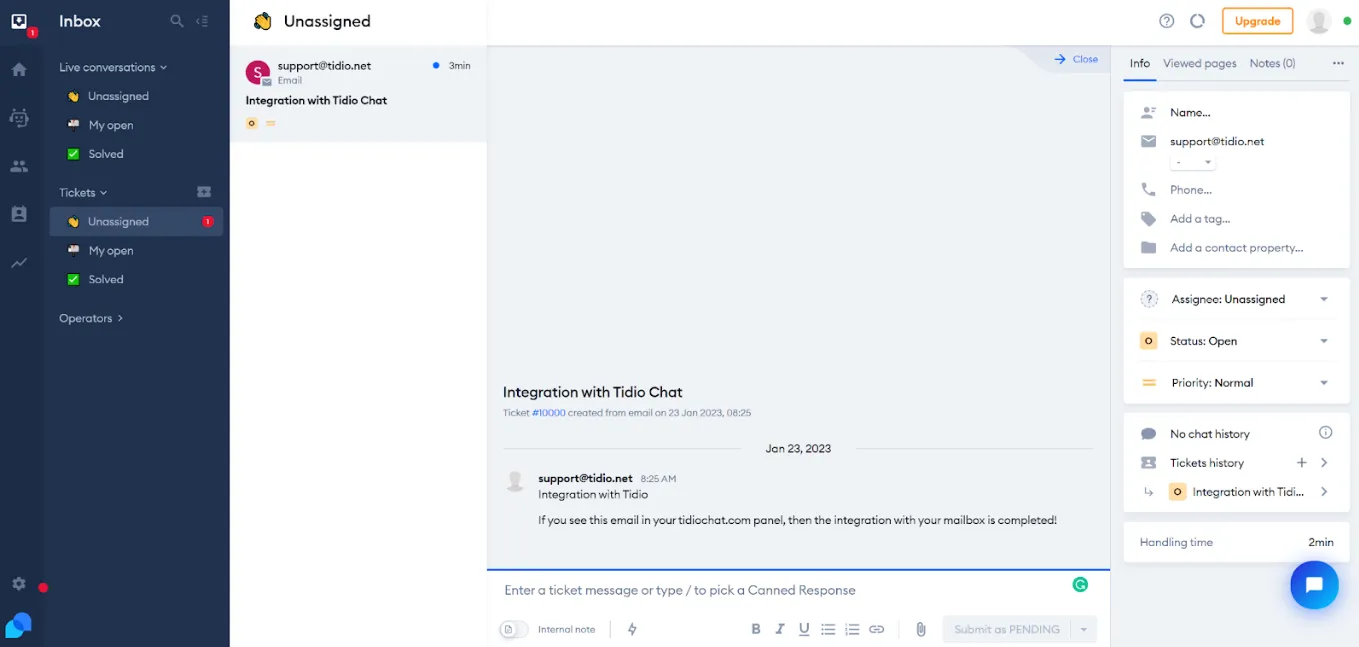
Best for: small online stores with modest traffic that want to test a bot before hiring.
Pricing (checked 6 September 2026, tidio.com/pricing): Free $0, Starter $24.17 a month, Growth from $49.17 a month, Plus from $300 a month plus usage. Lyro AI starts at $32.50 a month for 50 conversations, sold separately or bundled.
Pros
- A team of five pays the same as a team of two.
- The free plan includes a one-time batch of 50 Lyro conversations to test with.
- Friendly setup for Shopify and WordPress stores.
Cons
- The free plan stops at 50 conversations a month and Starter at 100, which a busy week can use up.
- Removing Tidio branding is a paid add-on.
- AI is a second line on the bill.
Verdict: fine for low volume. Once you pass a few hundred conversations a month, compare it against flat plans with our Tidio alternative page.
4. tawk.to: free for any number of agents
tawk.to gives away live chat, a knowledge base and ticketing with no seat charges and no time limit. It makes money from add-ons: removing its branding, AI Assist, and hired agents who answer chats for you.
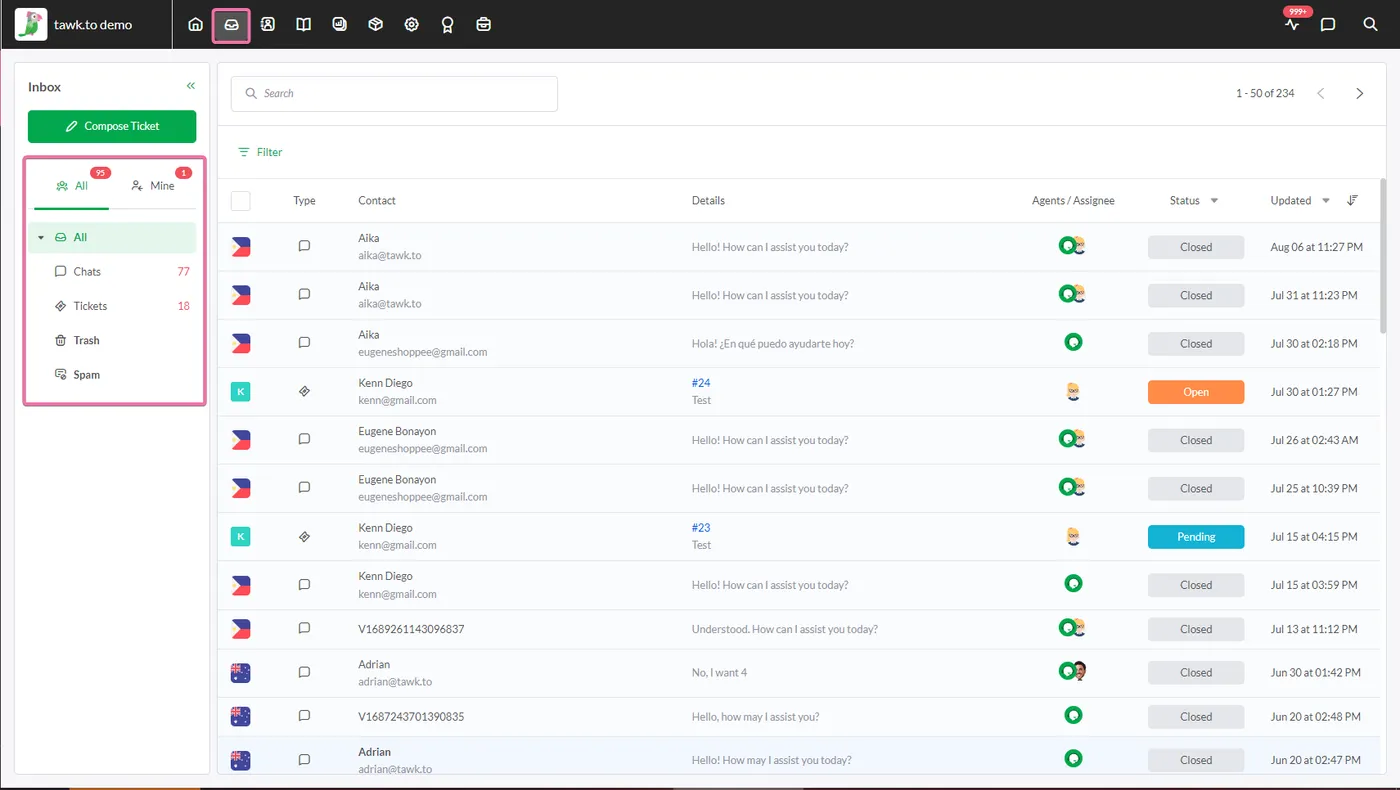
Best for: a business with no budget that still wants several people answering chats.
Pricing (checked 6 September 2026, tawk.to/pricing): live chat $0. Removing branding costs $29 a month, AI Assist starts at $29 a month with a small free tier, and hired agents cost $1 an hour.
Pros
- Genuinely free, with no agent cap.
- Ticketing and a help center included at no cost.
- Hired agents can cover nights if you have no one.
Cons
- The "Powered by tawk.to" badge stays unless you pay.
- Fewer design controls than paid tools.
- Adding branding removal and AI takes you to about $58 a month.
Verdict: the right first tool when money is the constraint. Many teams outgrow the look and the admin before they outgrow the price. See our tawk.to alternative notes if that happens.
5. LiveChat: polished chat for sales-led teams
LiveChat is one of the oldest dedicated chat products, focused on the chat window itself: canned responses, visitor tracking, sales tracking and a long list of integrations.
Best for: teams where chat drives revenue, such as stores with high-value carts or services that book calls from the website.
Pricing (checked 6 September 2026, livechat.com/pricing): Starter $19 per agent a month yearly ($25 monthly), Team $49 per agent yearly ($59 monthly), Business $79 per agent yearly ($89 monthly), Enterprise custom. Five agents on Team cost $245 a month. Text Intelligence (suggestions and summaries) is included; the separate ChatBot product starts at $52 a month yearly.
Pros
- A mature, fast agent workspace.
- Copilot features included in the seat price.
- Good reporting on chat-driven sales.
Cons
- No free plan.
- Per-agent pricing, so every hire adds $49 or more.
- A real chatbot means paying for a second product.
Verdict: worth it when each chat is worth money. For pure support, the per-seat cost is hard to justify at five agents. Our LiveChat alternative page shows the maths.
6. Help Scout: email first, with chat on the side
Help Scout is a shared email inbox and help center with a chat widget called Beacon. Chat is part of the product, but email is the center of gravity.
Best for: teams where most questions arrive by email and chat is a secondary channel.
Pricing (checked 6 September 2026, helpscout.com/pricing): Free $0, Standard $25 per user a month, Plus $45, Pro $75. Five users on Standard cost $125. The AI inbox assistant is included, and AI Answers, the chatbot, costs $0.75 per resolution.
Pros
- The cleanest email workflow on this list.
- A free plan to start on.
- AI Answers costs nothing in a month with no resolutions.
Cons
- Per-user pricing.
- Chat feels secondary to email.
- Per-resolution AI is hard to budget in a busy month.
Verdict: pick it if email is 80% of your support. We compared it with Freshdesk for a five-person team in Freshdesk vs Help Scout.
7. Gorgias: built around Shopify orders
Gorgias is a help desk for e-commerce. Its main draw is that order details from your store sit next to each conversation, so an agent can answer "where is my order" without switching tabs.
Best for: Shopify stores where most chats are about orders, returns and shipping.
Pricing (checked 6 September 2026, gorgias.com/pricing): Starter $10 a month, Basic $60, Pro $360, Advanced $900. Plans are sized by ticket volume, so five seats fit on Basic at $60. Extra tickets cost about $0.36 to $0.40 each, and the AI Agent about $0.90 to $1.00 per resolved conversation on top.
Pros
- Order data inside the conversation.
- Plans are sized by tickets, so hiring does not raise the bill.
- Strong macros for refunds and order edits.
Cons
- Overage on tickets makes busy months expensive.
- Less useful if you do not sell on Shopify.
- A big step from Basic ($60) to Pro ($360).
Verdict: excellent for a Shopify store's order questions; overkill for a service business. The Gorgias comparison covers stores that want flat pricing instead.
8. Intercom: the AI-first help desk
Intercom combines a chat messenger, a help desk and Fin, an AI agent that resolves questions from your help content. It is the most capable bot on this list and one of the hardest to budget.
Best for: SaaS companies with a good help center and enough volume for an AI agent to matter.
Pricing (checked 6 September 2026, intercom.com/pricing): Essential $29 per seat a month, Advanced $85, Expert $132. Fin costs from $0.99 per outcome on every plan, and Copilot is $29 per agent a month yearly ($35 monthly). WhatsApp, SMS and phone are pay-as-you-go.
Pros
- Fin is strong when your docs are good.
- Messenger, help center and tickets in one product.
- Scales a long way past small business.
Cons
- Three meters: seats, outcomes and Copilot.
- Five seats on Advanced reach $425 a month before AI.
- More setup than a small team usually wants.
Verdict: Fin is the reason to pay Intercom's prices. If you only need people answering a widget, it is a lot of tool. See our Intercom comparison for the costs side by side.
9. Zendesk: for teams outgrowing chat-only tools
Zendesk is a full customer service suite: ticketing, messaging, a help center and, unlike everything above, a phone channel. Live chat and messaging come with the Suite plans.
Best for: teams heading past ten agents, or any team that needs voice support alongside chat.
Pricing (checked 6 September 2026, zendesk.com/pricing): Support Team $19 per agent a month, Suite Team $55, Suite Professional $115, Suite Enterprise custom. Five agents on Suite Team cost $275 a month. AI agents are billed per automated resolution on top, and Copilot is $50 per agent a month.
Pros
- Phone, chat, email and tickets in one place.
- Deep reporting and SLAs.
- A huge marketplace of add-ons.
Cons
- Expensive per agent for a small team.
- Admin takes real time to learn.
- AI and Copilot add two more charges.
Verdict: the safe choice for a growing operation with complex needs. For three people answering a website widget it is more cost and setup than the job requires. The Zendesk alternative page goes through why small teams leave.
Free vs paid: what you actually give up
Five tools here have a free plan. Each one is limited in a different place, and the limit matters more than the price:
- tawk.to limits nothing about agents or chats. You give up control of the badge and some polish.
- Tidio limits volume: 50 conversations a month. Fine for a new shop, gone in a week for a busy one.
- Crisp limits seats (2) and customer profiles (100), and has no AI credits.
- Our own free plan limits seats (2) and channels: it covers website chat only.
- Help Scout has a free tier for getting started; paid plans add the users and features a team needs.
A useful rule: stay on free while one or two people answer chats and you get fewer than a couple of chats a day. Once a third person joins, or customers start writing in by email as well, the time lost switching between tools is usually worth more than a $20 to $50 plan. Our seat vs workspace pricing calculator shows where each pricing model gets cheaper as your team grows.
How to choose the best live chat software for small business in ten minutes
Answer these five questions in order and stop at the first one that settles it:
- Is your budget $0? Use tawk.to, or the free plan from Crisp or from us if two seats are enough.
- Do you sell on Shopify, with most chats about orders? Try Gorgias, or Tidio if volume is low.
- Is most of your support email? Help Scout.
- Do you need a phone channel, or have more than ten agents? Zendesk.
- Do you want an AI agent to resolve most questions from your docs? Intercom with Fin if your budget allows per-outcome billing; Tidio, Crisp or our own agent if you want a capped monthly cost.
If none of those settle it, put your team size into a cost calculator before you look at features. Our competitor cost calculators do the multiplication for each vendor. Then run a one-week trial of your top two with real chats. You will learn more from one Friday afternoon of real traffic than from any feature grid.
When you install, write the welcome message before you go live. "Questions about your order or delivery? Ask here" tells a visitor far more than "How can I help?". The free welcome message generator gives you a few to start from.
FAQ
What is the best free live chat software for a small business?
tawk.to, if you need more than two people answering chats and can live with its badge. If two seats are enough and you want a cleaner widget, the free plans from Crisp and from us are worth a look. Tidio's free plan suits you only while you stay under 50 conversations a month.
How much should a small business pay for live chat?
For three to five agents, list prices on this page run from $0 (tawk.to) to $275 a month (Zendesk Suite Team), before any AI charges. Leaving out the free options, three agents cost from $20 a month on the cheapest paid plan here to $165 on Zendesk Suite Team. Per-agent tools cost more each time you hire; per-plan tools do not.
Do I need an AI chatbot on my live chat?
Not on day one. Turn on an AI agent once you see the same handful of questions every day and you have written answers it can learn from. Check how it is billed first: per resolution can cost more than you expect in a busy month. Our AI resolution cost calculator compares per-resolution and flat pricing.
What is the difference between live chat and a help desk?
Live chat is the widget and the real-time conversation. A help desk adds tickets, email, a help center, SLAs and reporting across channels. Tools like Help Scout, Zendesk and Intercom are help desks with chat; tawk.to and LiveChat start from the chat side.
Can I add live chat to Shopify, WordPress or Wix?
Yes. Every tool on this list installs with a JavaScript snippet pasted into your theme or site settings, and several also offer store apps. Our guides for Shopify and WordPress walk through where the snippet goes.