

A Shopify help desk app earns its price when a large share of your messages need someone to change an order: refunds, cancellations, address edits, reships. If most messages are questions you can answer in a sentence or two, a shared inbox with live chat covers the job for less money and less setup. The rest of this guide shows where that line sits for a small store, what each option costs at one, three and five support staff, and how to switch later without losing history.
The short verdict
- Pick a Shopify help desk app (Gorgias is the best-known example) if your team spends its day inside orders: refunds, cancellations, edits and reships, at a volume where opening the Shopify admin for each one slows everyone down.
- Pick a shared inbox with live chat if your messages are mostly pre-sale questions, sizing, shipping times and "where is my order", and you have more than one channel to watch.
- Start with Shopify Inbox if you are one person answering storefront chat and nothing else.
Side by side: help desk app, shared inbox and Shopify Inbox
| Shopify help desk app | Shared inbox with live chat | Shopify Inbox | |
|---|---|---|---|
| Built for | Stores whose tickets are mostly order changes | Small teams answering several channels | One person answering storefront chat |
| Typical pricing | By monthly ticket volume (Gorgias Basic $60) | Per seat or per workspace ($20 to $125 for five people) | Free |
| Order actions | Refund, cancel or edit inside the ticket | Look up the order, act on it in Shopify admin | Order status questions, carts and discounts in chat |
| Channels | Email, chat, social, often phone | Chat, email and messaging apps, depending on the tool | Storefront chat, with email follow-up |
| AI | Usually per resolved conversation | Varies: included credits, per resolution or add-on | Suggested replies and instant answers |
| Setup | An afternoon plus macros and rules | Under an hour for chat and email | Minutes |
| Team features | Assignment, rules, views, reports | Assignment, notes, collision warnings, reports | Basic staff handoff |
Prices are each vendor's published list price, checked 2026-09-06, except Shopify Inbox, which Shopify lists as free on the Shopify App Store.
What a Shopify help desk app actually adds
A Shopify help desk app is a ticketing tool that reads and writes to your store. The pitch is that the agent never leaves the ticket. The order list, fulfilment status and tracking number sit beside the conversation, and the buttons to act on them sit there too.
- Order panel: every past order for the customer, with items, totals, fulfilment and tracking.
- Order actions: refund, cancel, duplicate or edit an order from the ticket.
- Macros with order variables, so a reply can insert the tracking link or the order number automatically.
- Rules that tag or route tickets by order data, such as high-value customers or orders still unfulfilled.
- Revenue reporting that ties support conversations to sales.
What you give up is simplicity and a predictable bill. Gorgias, the most common example, charges by monthly ticket volume rather than seats, so a holiday spike raises the price even if your team stays the same size.
What a shared inbox with live chat covers
A shared inbox puts every customer conversation, from every channel, into one queue that the whole team works. It solves the problems small teams hit first: two people answering the same email, a chat nobody saw, and no way to know who owns what.
- One queue for website chat, email and messaging apps.
- Assignment, so each conversation has a single owner.
- Internal notes and a warning when a teammate is already typing.
- Saved replies for the questions you answer every day.
- Reports on first response time, resolution time and satisfaction.
The gap is order actions. Some shared inboxes connect to Shopify to show recent orders beside a conversation, but the refund or the address change still happens in the Shopify admin, in another tab. For a store where that happens ten times a day, it is a small cost. At a hundred times a day it adds up fast. Our shared inbox page shows how the queue and assignment work.
Where Shopify Inbox fits
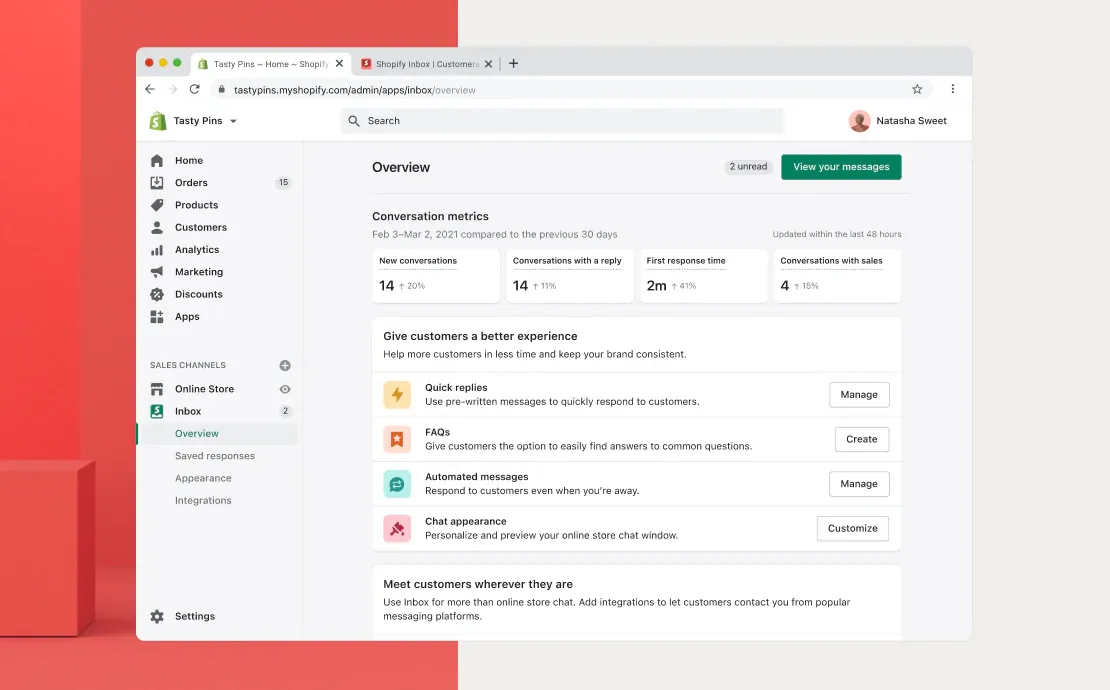
Shopify Inbox is Shopify's own free chat app. Shoppers chat from the storefront, and you reply from the Shopify admin or mobile app. You can see the shopper's cart, send product links and discount codes, and it comes with an automated reply that collects an order number and email for order status questions. Its AI agent can answer some questions and hand the rest to staff, according to Shopify's help center.
It stops being enough when you have email, social messages and chat to manage together, or when two or three people need clear ownership and internal notes. That is usually the moment stores start shopping for one of the other two options.
Ticket volume and the order-action test
Raw ticket count matters less than what is inside the tickets. Try this on last month's messages: take the first 100 and mark each one that needed you to change an order in Shopify. Answering "it ships Tuesday" does not count. Refunding, cancelling, editing an address or creating a replacement does.

- Under about 20 marked: a shared inbox is the better fit. Most of your work is writing answers, not editing orders.
- Between 20 and 40: either works. Decide on channels and budget.
- Over 40: a Shopify help desk app will likely pay for itself in saved clicks.
These thresholds are a rule of thumb, not a published benchmark. Here is a hypothetical store to show the math. It handles 600 tickets a month, 300 of them need an order change, and switching to the Shopify admin to make each change takes an extra minute. That is five hours a month spent in another tab. If an agent costs $20 an hour, the time is worth about $100 a month, so a help desk app that costs a few hundred dollars more is hard to justify on clicks alone. At 3,000 order changes a month the answer flips.
Order lookups and refunds: manual vs inside the tool
Here is the same refund done both ways.
In a shared inbox, the agent reads the message, copies the order number, opens Shopify admin, finds the order, issues the refund, comes back, and replies. With a pinned Shopify tab and good saved replies, a practised agent does it in under two minutes.
In a Shopify help desk app, the order is already showing next to the message. The agent clicks refund, picks the items, and sends a macro that fills in the amount. It takes seconds, and the action is recorded on the ticket for the next person.
The second way is clearly faster per ticket. The question is whether you do it often enough for the speed to matter, and whether you want agents to have refund buttons at all. Some owners prefer that refunds above a set amount go through one person in Shopify.
Cost at 1, 3 and 5 support staff
List prices per month, checked 2026-09-06. AI usage is extra on every paid option below.
| Option | 1 person | 3 people | 5 people | Notes |
|---|---|---|---|---|
| Shopify Inbox | $0 | $0 | $0 | Storefront chat only |
| Gorgias (Starter, Basic, Pro) | $10 to $360 | $10 to $360 | $10 to $360 | Priced by ticket volume, not staff; AI Agent about $0.90 to $1.00 per resolution |
| Help Scout Standard | $25 | $75 | $125 | $25 per user; chatbot $0.75 per resolution |
| Zendesk Suite Team | $55 | $165 | $275 | $55 per agent; Copilot $50 per agent extra |
| Sellio (Free, then Mini) | $0 | $20 | $20 | Free covers 2 seats and website chat; Mini is per workspace with 5 seats and 3 channels |
Gorgias costs the same at one person or five because seats are not what it charges for; a busy month is. Extra tickets above your plan cost about $0.36 to $0.40 each. Check current tiers on Gorgias pricing, and run your own volume through the competitor cost calculator.
Team handoffs, assignments and internal notes
Once a second person answers customers, coordination becomes the daily problem. Both kinds of tool handle it, with different defaults.

- Assignment: help desks lean on rules that route tickets automatically; shared inboxes usually start with claim-it or round robin, which is plenty for three people.
- Internal notes: both let you leave a note on a conversation that the customer never sees. Use them for "refund approved by Sam" so the next person does not ask again.
- Collision warnings: check that the tool shows when someone else is replying. Without it, two agents answer the same angry customer.
- Handoff from AI: if a bot answers first, make sure the conversation lands with a person, with the transcript, when the bot is unsure.
What Sellio covers today and what is coming soon for Shopify
We build a shared inbox and live chat tool, so here is exactly where it stands for Shopify stores. There is no Shopify App Store app. The chat widget installs on any Shopify store today, through your theme or with one script tag, and the live chat for Shopify guide walks through it.
- Live today: website chat on your store, email, Telegram, Slack and Discord in one inbox, with assignment, internal notes, tickets, automations and reports.
- AI agent: answers on website chat only, from your own site and documents, hands off to a person when unsure, and can be capped. It cannot look up orders today. AI usage past the included credits costs extra.
- Coming soon, not available yet: the Shopify integration that shows a shopper's orders, payments and fulfilment beside the conversation, plus WhatsApp, Instagram and Facebook Messenger.
- Not available: refunds or order edits from inside the inbox. Those stay in your Shopify admin.
So if the order-action test above came out over 40, a Shopify help desk app is the better buy today. If it came out low and you want chat, email and a few other channels in one place, it fits, and the pricing page lists the plans.
Choose a help desk app if, choose a shared inbox if
Choose a Shopify help desk app if:
- More than about 40 of every 100 tickets need an order change.
- You want agents to refund, cancel and edit without opening Shopify.
- Your volume is steady enough that ticket-based pricing will not swing wildly.
Choose a shared inbox with live chat if:
- Most messages are questions, not order changes.
- You answer on several channels and need one queue with clear ownership.
- You want a bill that does not jump in November and December.
Stick with Shopify Inbox if you are one person, chat is your only channel, and it is working.
Migrating from one to the other later
Neither choice locks you in for long. A few habits make a later move painless.
- Export conversation history before you cancel. Most tools offer a CSV or API export; keep it even if you never import it.
- Keep your saved replies in a plain document as well as in the tool. They are the most valuable thing you built, and they copy across in an hour.
- Use your own support email address, forwarded into the tool, never one the vendor gives you. Moving is then a forwarding change.
- Run both tools side by side for a week. New conversations go to the new tool; finish open ones in the old one.
The support tool migration checklist covers the rest, including what to tell customers.
FAQ
Is Shopify Inbox enough for a small store?
For one person answering storefront chat, often yes, and it is free. It gets thin when you need email and social messages in the same queue, or when several people need assignment and internal notes.
Do I need a Shopify help desk app to see order details?
No. Several shared inboxes and help desks connect to Shopify to show orders beside a conversation. What a dedicated Shopify help desk adds is acting on the order, such as refunds and edits, from inside the ticket.
Why does Gorgias cost the same for one agent and five?
Gorgias prices by the number of tickets each month, not by seats. Adding staff is free, but a busier month can push you into overage or a higher tier.
Can AI answer order status questions?
Most tools now offer some form of it. Shopify Inbox has an automated order status reply, and help desk apps sell AI agents priced per resolved conversation. Check what counts as a resolution before you turn it on.
When should a store move from a shared inbox to a help desk app?
When order changes become a large share of your messages, or when refunds through the Shopify admin start to slow the queue. Rerun the 100-ticket test every quarter; the answer changes as you grow. If you are weighing general help desks too, our Freshdesk vs Help Scout comparison prices both for a five-person team.