

HubSpot Service HubShopify InboxHubSpot Service Hub vs Shopify Inbox

HubSpot Service Hub vs Shopify Inbox: $75 or $0 for five people

A CRM-based help desk against a free chat for Shopify stores: Shopify Inbox is $75 a month cheaper for five people. Where HubSpot Service Hub and Shopify Inbox split, and a third option for small teams.

By Khalid Nouri, founder of SellioPricing check dates are listed with each vendor below

No credit card. Live in minutes.

The short answer

Pick HubSpot Service Hub if your sales and marketing already live in HubSpot and support should share the CRM. Pick Shopify Inbox if you run a Shopify store and want free chat with the cart in view. For five people, Shopify Inbox is $75 a month cheaper than HubSpot Service Hub ($75 a month on HubSpot Service Hub against $0 on Shopify Inbox), before AI. Sellio Mini is $45, which only Shopify Inbox's figure comes under. HubSpot Service Hub and Shopify Inbox both include website chat in the price; only HubSpot Service Hub has email. Neither HubSpot Service Hub nor Shopify Inbox includes WhatsApp, Instagram and Telegram outright. For a team of two to ten weighing HubSpot Service Hub against Shopify Inbox, the third option below puts chat and tickets at one workspace price.

At a glanceHubSpot Service HubHubSpot Service HubShopify InboxShopify Inbox
Built aroundThe CRM record · help desk on top of HubSpotThe storefront chat · free with a Shopify plan
Entry plan$15/seat/mo · Starter, yearly$0 · with any Shopify plan
Chat in the price$0 · Free tools: chat with HubSpot branding$0 · storefront and Shop app
AI agent$9 per 1,000 credits · 50 credits per resolutionIncluded · AI chat from the catalog and policies
Copilot for agentsBreeze · in the plansIncluded · suggested replies
Free planYes · 2 users, branded chatYes · the app is free

The six differences that decide it

Everything else on this page follows from these.

  1. 01

    Where a conversation starts

    HubSpot Service HubHubSpot Service Hub

    As a ticket on the CRM contact, with every marketing and sales touch beside it. Shopify Inbox has no ticket queue behind its conversations.

    Shopify InboxShopify Inbox

    As a chat on the storefront or in the Shop app, with the cart and orders beside it. HubSpot Service Hub raises a ticket where Shopify Inbox keeps a conversation.

  2. 02

    What the seat buys

    HubSpot Service HubHubSpot Service Hub

    Starter is $15 a seat; Professional is $90 with a $1,500 onboarding fee, and that is where routing and SLAs start. $75 for five people, against $0 on Shopify Inbox.

    Shopify InboxShopify Inbox

    There is no seat price; staff are limited by the Shopify plan's staff accounts. $0 for five people, against $75 on HubSpot Service Hub.

  3. 03

    How the AI is billed

    HubSpot Service HubHubSpot Service Hub

    Customer Agent costs 50 credits per resolved conversation, and credits are $9 per 1,000, so about $0.45 a resolution. Shopify Inbox folds AI (included) into the plan instead.

    Shopify InboxShopify Inbox

    The AI chat learns the catalog and policies and is included; there is nothing to meter. HubSpot Service Hub meters AI ($9 per 1,000 credits) above the seats instead.

  4. 04

    Channels in the price

    HubSpot Service HubHubSpot Service Hub

    Chat, email and Messenger on the lower plans; WhatsApp and calling on Professional; no Telegram. email is here and not on Shopify Inbox.

    Shopify InboxShopify Inbox

    Storefront chat and the Shop app; no email, WhatsApp, Instagram or Telegram in the inbox. HubSpot Service Hub adds email, which Shopify Inbox lacks.

  5. 05

    Beyond the inbox

    HubSpot Service HubHubSpot Service Hub

    The rest of HubSpot: marketing, sales, CMS and the shared CRM. Shopify Inbox is a free chat for Shopify stores instead.

    Shopify InboxShopify Inbox

    Product recommendations, discount codes and order updates inside the chat. HubSpot Service Hub is a CRM-based help desk instead.

  6. 06

    Time to the first reply

    HubSpot Service HubHubSpot Service Hub

    An afternoon on Starter; Professional comes with a paid onboarding. Shopify Inbox is minutes.

    Shopify InboxShopify Inbox

    Minutes: install the app from the Shopify admin. HubSpot Service Hub is an afternoon on Starter.

Sources: HubSpot Service Hub pricing · Shopify Inbox pricing. Each vendor’s own comparison of the other is linked so you can weigh both sides against ours.

What each one looks like

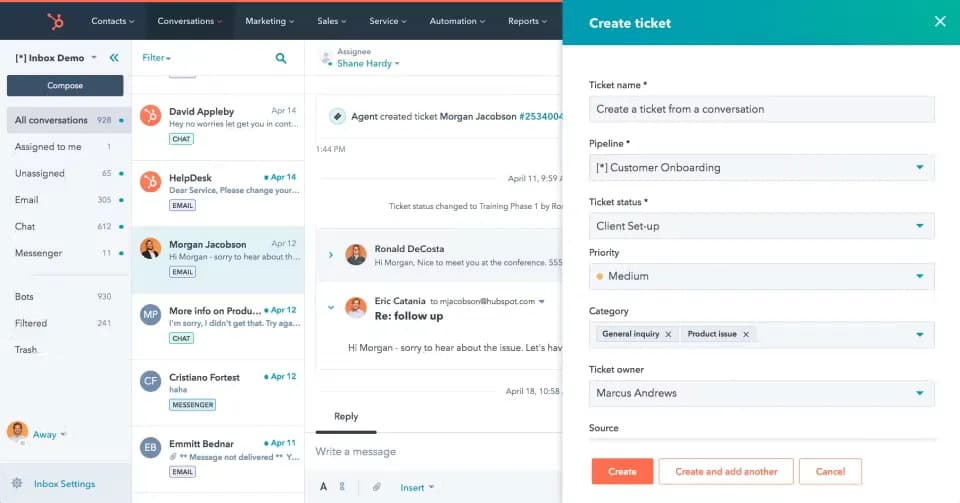
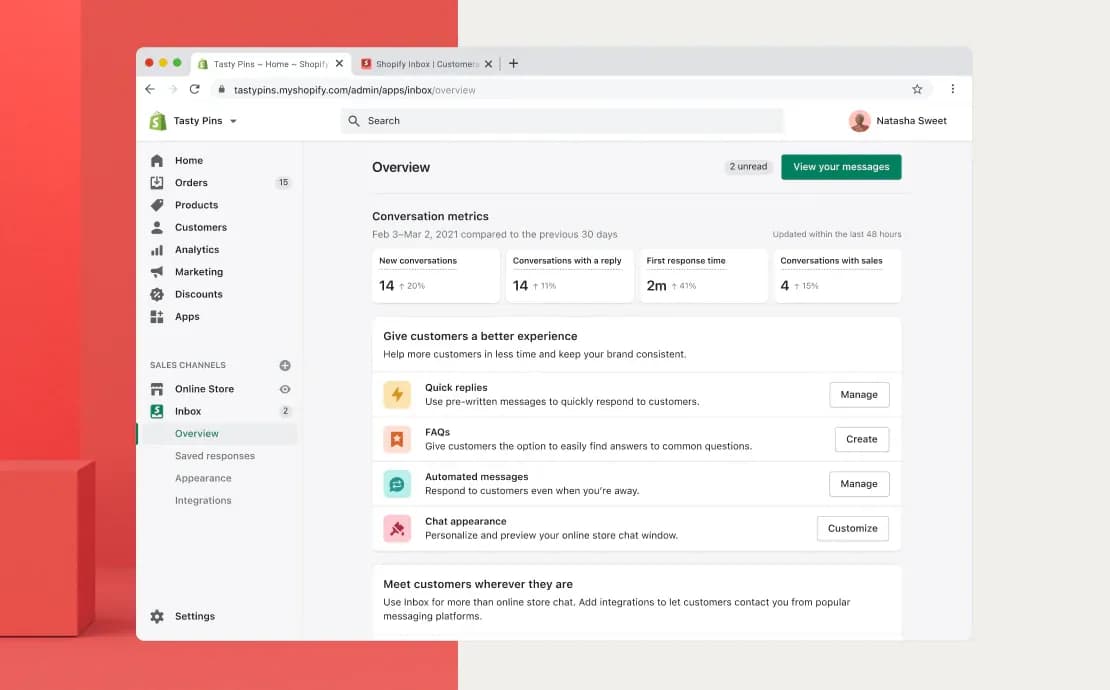
A look at the agent workspace. Interfaces can vary by plan and product version.

The HubSpot help desk workspace: the ticket with the CRM contact and its timeline
HubSpot Service HubHubSpot Service Hub. The HubSpot help desk workspace: the ticket with the CRM contact and its timeline
The Shopify Inbox conversation: the chat with the customer's cart and orders on the side
Shopify InboxShopify Inbox. The Shopify Inbox conversation: the chat with the customer's cart and orders on the side

Pricing references: HubSpot Service Hub pricing page (recorded 2026-09-13); Shopify Inbox pricing page (recorded 2026-09-13). Prices change; confirm current terms with each vendor.

HubSpot Service Hub, Shopify Inbox and Sellio, side by side

Fifteen things a support team checks. A dash means the product does part of it or charges extra for it.

FeatureHubSpot Service HubHubSpot Service HubShopify InboxShopify InboxSellio

Pricing

Pricing model
Per seat; onboarding fees; AI by credits
Free with Shopify
Per workspace; seats and channels are plan limits
Free plan
2 users, HubSpot branding
The whole app
2 seats, 1 channel, 1 AI agent, no trial clock

Channels

Website live chat
All plans
Storefront and Shop app
One script tag; guides for HTML, React, Next.js and more
Email in the inbox
All plans
Not offered
From Mini: forward your support address; reply from the thread
WhatsApp
Professional and up
Not offered
From Mini: WhatsApp Business API, several agents on one number
Instagram DMs
Messenger only
No longer connected
From Mini: Instagram DMs beside web chat
Telegram
Not offered
Not offered
From Mini: paste a bot token; the webhook is set for you
Slack, Discord, Teams (two-way)
Slack and Teams notifications
Not offered
From Mini: two-way threads; a reply there reaches the customer

AI

AI agent trained on your docs
Customer Agent
Learns the catalog
Crawl your site, upload PDFs and FAQs; answers only from those
How AI is billed
50 credits per resolution, $9 per 1,000
Included
Metered from an included credit, with caps you set
AI hands off to a person
Creates a ticket
Hands to staff
On low confidence, a keyword, or a teammate taking over

Support operations

Tickets
On the CRM record
Chats only
On Plus: raise from any chat; customer, back-office and tracker
Visual workflow automation
Professional and up
Instant answers, greetings
From Mini: 11 triggers, 18 actions, no code
Analytics and CSAT
Reports; advanced on Professional
Assisted orders
From Essentials: response times, resolution, CSAT; topics and email reports on Plus

Apps

Desktop app (Windows, macOS)
Browser and mobile
Admin and mobile
Native Windows and macOS apps

Which one, for whom

Pick HubSpot Service Hub if

  • Your sales and marketing already live in HubSpot and support should share the CRM.
  • You want an AI agent priced per resolution at under a dollar.
  • You need email in the price, which Shopify Inbox does not include outright.
  • You need a ticket queue, which Shopify Inbox does not have.

Pick Shopify Inbox if

  • You run a Shopify store and want free chat with the cart in view.
  • One channel is enough and you do not need tickets.
  • Five people cost $75 a month less than on HubSpot Service Hub ($0 against $75), before AI.
  • You want the AI in the seat price (included) rather than HubSpot Service Hub's meter at $9 per 1,000 credits.

The third option: Sellio

  • Your team is two to ten people on chat, messaging and email. Weigh workspace pricing against $75 a month on HubSpot Service Hub against $0 on Shopify Inbox for five people; the billing units and included features differ.
  • You want a ceiling on AI spend: HubSpot Service Hub meters AI ($9 per 1,000 credits) above the seats, Shopify Inbox folds AI (included) into the plan, and Sellio stops at the cap you set.
  • You need Telegram and native Windows and macOS apps, which neither HubSpot Service Hub nor Shopify Inbox includes.

What two, five and ten people pay

HubSpot Service Hub on Starter: $30, $75 and $150 a month for two, five and ten people, before AI. Shopify Inbox: $0 a month for five (free; five staff need the Shopify plan that allows them); it does not print a per-seat rate to extend to two or ten. Sellio: Free for two seats; Mini at $45 for five, $30 less than HubSpot Service Hub and more than Shopify Inbox's $0 for five people; Essentials at $95 for ten, the AI credit included. At ten people, Essentials at $95 is $55 under HubSpot Service Hub.

Where the two agree, and where they split

HubSpot Service Hub is a CRM-based help desk built around the CRM record; Shopify Inbox is a free chat for Shopify stores built around the storefront chat. Both have a free plan: HubSpot Service Hub's is 2 users, branded chat, Shopify Inbox's is the app is free. HubSpot Service Hub and Shopify Inbox both include website chat in the price; only HubSpot Service Hub has email. Neither HubSpot Service Hub nor Shopify Inbox includes WhatsApp, Instagram and Telegram outright. HubSpot Service Hub meters AI ($9 per 1,000 credits) above the seats; Shopify Inbox folds AI (included) into the plan. HubSpot Service Hub has tickets and Shopify Inbox does not, and neither HubSpot Service Hub nor Shopify Inbox ships a desktop app. HubSpot Service Hub is an afternoon on Starter; Shopify Inbox is minutes.

What each price leaves out

HubSpot Service Hub: HubSpot Credits at $9 per 1,000; Customer Agent uses 50 credits per resolved conversation. Shopify Inbox: AI chat and suggested replies included. Beside HubSpot Service Hub's $9 per 1,000 credits and Shopify Inbox's included, Sellio includes an AI credit with each paid plan. Usage consumes that credit; additional credits cost extra, and you can set a spending cap.

How to decide in an afternoon

  1. Step 1

    Count agents and channels

    Anyone who replies is a seat. List the channels customers actually use.

    5 people reply5 seats
    Website chat61%
    WhatsApp27%
    Email12%
  2. Step 2

    Price the AI you would use

    Estimate monthly conversations the AI could close, then apply each vendor's per-resolution or per-session rate.

    1,200 conversations × 40% AI closes480
    HubSpot Service HubHubSpot Service Hub$0.45$212
    Shopify InboxShopify InboxSee vendorNot quoted
    Sellio$0.05$19

    Illustrative AI-only estimate; vendor units differ. Pack billing is rounded up. Sellio assumes Mini’s $5 credit and $0.05 per conversation.

  3. Step 3

    Trial the shortlist

    Check each vendor’s trial, free plan or demo terms. Where access is available, test one real channel before committing.

    HubSpot Service HubHubSpot Service Hub · Free tools, no trial clock
    Shopify InboxShopify Inbox · Not applicable; free
    Sellio · Free plan, no card

    Confirm trial access and limits, then evaluate one real channel on each.

FAQ

HubSpot Service Hub vs Shopify Inbox: the questions people ask

HubSpot Service Hub is a CRM-based help desk built around the CRM record; Shopify Inbox is a free chat for Shopify stores built around the storefront chat.

  • Entry plan: HubSpot Service Hub $15/seat/mo (Starter, yearly); Shopify Inbox $0 (with any Shopify plan).
  • Chat in the price: HubSpot Service Hub $0 (Free tools: chat with HubSpot branding); Shopify Inbox $0 (storefront and Shop app).
  • Sellio puts every channel in one inbox: WhatsApp, Instagram and Telegram, which neither HubSpot Service Hub nor Shopify Inbox has outright, plus the rest of the five, on every paid plan.

Sellio's side of the HubSpot Service Hub and Shopify Inbox rows is on the shared inbox page.

Still have a question? Contact us or browse the docs.

Or the third option: one price, every channel.

Sellio puts website chat, WhatsApp, Instagram, Telegram and email in one inbox with tickets and an AI agent, for $45 to $295 a month per workspace.

No credit card required